NinjaTrader has a VWAP in some data configurations, but building a session VWAP yourself is instructive and works anywhere you have volume. The key is NinjaTrader’s built-in session detection. See the explainer for the concept.
What you’ll need
- NinjaTrader 8
- New → NinjaScript Editor → Indicators → New Indicator, name it
AlgoGenVWAP - An intraday chart
The source
#region Using declarations
using System;
using System.Windows.Media;
using NinjaTrader.NinjaScript;
using NinjaTrader.NinjaScript.Indicators;
#endregion

namespace NinjaTrader.NinjaScript.Indicators
{
    public class AlgoGenVWAP : Indicator
    {
        private double cumPV;
        private double cumV;

        protected override void OnStateChange()
        {
            if (State == State.SetDefaults)
            {
                Name        = "AlgoGen VWAP";
                Description = "Session VWAP (resets each trading day)";
                IsOverlay   = true;

                AddPlot(new Stroke(Brushes.OrangeRed, 2), PlotStyle.Line, "VWAP");
            }
        }

        protected override void OnBarUpdate()
        {
            // Reset the running sums at the first bar of each session.
            if (Bars.IsFirstBarOfSession)
            {
                cumPV = 0;
                cumV  = 0;
            }

            double typical = (High[0] + Low[0] + Close[0]) / 3.0;
            double vol = Volume[0];

            cumPV += typical * vol;
            cumV  += vol;

            Value[0] = cumV > 0 ? cumPV / cumV : typical;
        }
    }
}
Compile & apply
- Press F5 to compile.
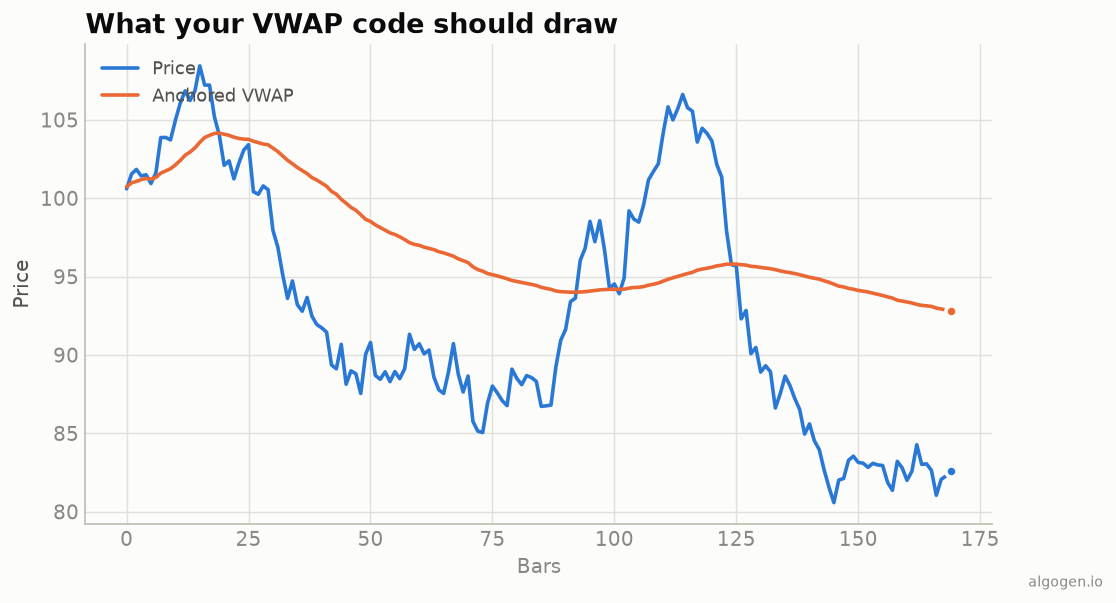
- Add AlgoGen VWAP to an intraday chart; it overlays price and resets each session, matching the concept from the output chart (shown anchored there).
Gotchas
Bars.IsFirstBarOfSession. This is NinjaTrader’s clean way to detect a new trading session for the reset — more robust than comparing dates, since it respects the instrument’s trading hours template.- Historical vs real-time. Using plain
doubleaccumulators is fine here because VWAP is a forward-only cumulative within a session; just be aware they rebuild correctly asOnBarUpdatewalks the bars. - Volume quality. On instruments without real volume this VWAP is only a proxy; NinjaTrader’s order-flow VWAP needs the appropriate market data.
- Using it as a filter. In a strategy, gate entries on the VWAP side rather than trading VWAP directly:
// In a strategy's OnBarUpdate:
if (Close[0] > Value[0] && CrossAbove(Close, Value, 1))
    EnterLong();     // only long when reclaiming VWAP from below
- Bands. Add ±standard-deviation plots (accumulate a volume-weighted variance
the same way you accumulate
cumPV) to frame how stretched price is from fair value, mirroring the Python bands.
That’s the five-language set: Python, MQL5, Pine Script, EasyLanguage, and this one. Now test a VWAP strategy in AlgoGen.
This post is educational, not financial advice. Indicators describe the past; they don’t predict the future. Backtest anything before you risk real money on it.
Sources and further reading
- The Total Cost of Transactions on the NYSE (The Journal of Finance)
- NinjaScript system indicator methods (NinjaTrader)