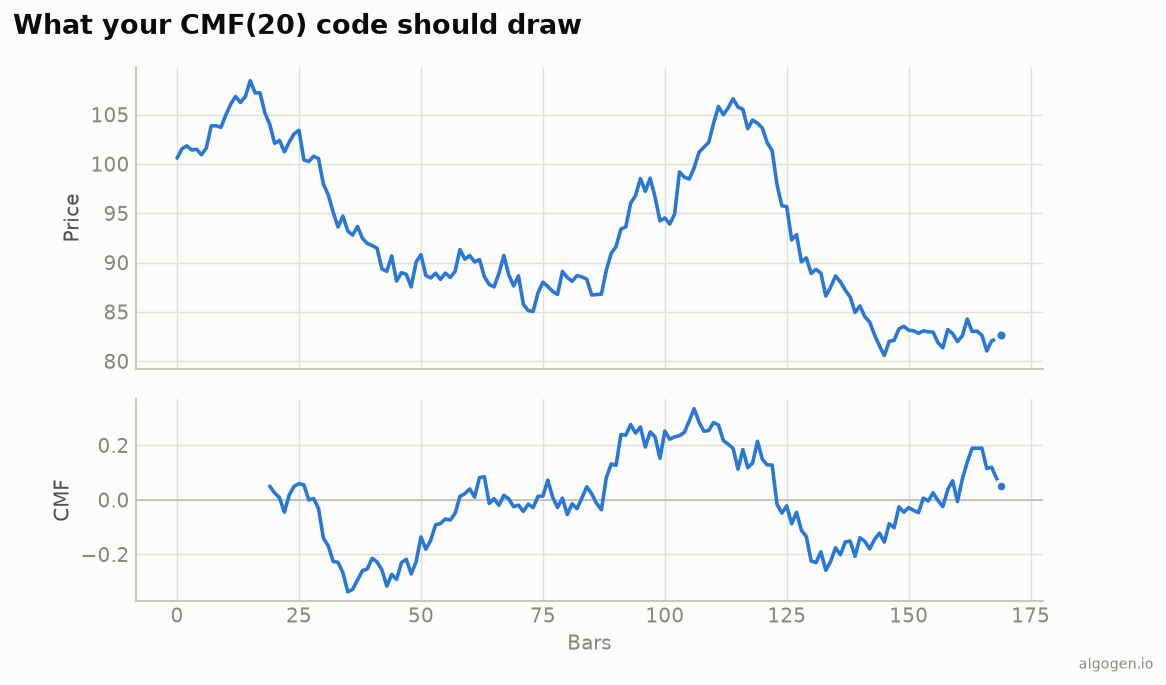
Chaikin Money Flow in NinjaScript keeps money flow volume in a Series<double> and
sums it against volume over the window. See the explainer for
the concept.
What you’ll need
- NinjaTrader 8
- New → NinjaScript Editor → Indicators → New Indicator, name it
AlgoGenCMF
The source
#region Using declarations
using System;
using System.Windows.Media;
using NinjaTrader.NinjaScript;
using NinjaTrader.NinjaScript.Indicators;
#endregion

namespace NinjaTrader.NinjaScript.Indicators
{
    public class AlgoGenCMF : Indicator
    {
        private Series<double> mfv;

        protected override void OnStateChange()
        {
            if (State == State.SetDefaults)
            {
                Name        = "AlgoGen CMF";
                Description = "Chaikin Money Flow";
                Period      = 20;
                IsOverlay   = false;

                AddPlot(new Stroke(Brushes.DodgerBlue, 2), PlotStyle.Line, "CMF");
                AddLine(Brushes.Gray, 0, "Zero");
            }
            else if (State == State.DataLoaded)
            {
                mfv = new Series<double>(this);
            }
        }

        protected override void OnBarUpdate()
        {
            double rng = High[0] - Low[0];
            double mfm = rng == 0 ? 0.0 : ((Close[0] - Low[0]) - (High[0] - Close[0])) / rng;
            mfv[0] = mfm * Volume[0];

            if (CurrentBar < Period - 1)
                return;

            double sumMfv = 0, sumVol = 0;
            for (int i = 0; i < Period; i++)
            {
                sumMfv += mfv[i];
                sumVol += Volume[i];
            }
            Value[0] = sumVol == 0 ? 0.0 : sumMfv / sumVol;
        }

        #region Properties
        [NinjaScriptProperty][System.ComponentModel.DataAnnotations.Range(1, int.MaxValue)]
        [System.ComponentModel.Display(Name = "Period", GroupName = "Parameters", Order = 0)]
        public int Period { get; set; }
        #endregion
    }
}
Compile & apply
- Press F5 to compile.
- Add AlgoGen CMF to a chart; the oscillator draws in its own panel around zero, matching the output chart.
Gotchas
- Flat-bar guard.
rng == 0 ? 0.0prevents a divide-by-zero on a locked bar. mfvas a Series. Storing money flow volume in aSeries<double>lets the window loop readmfv[i]and survives reloads.- Sum, then divide. Accumulate money flow volume and volume separately over the window, then divide once — not per-bar averaging.
- Volume quality. On instruments without real volume, CMF is only a proxy.
That’s the five-language set: Python, MQL5, Pine Script, EasyLanguage, and this one. Now test a CMF filter in AlgoGen.
This post is educational, not financial advice. Indicators describe the past; they don’t predict the future. Backtest anything before you risk real money on it.
Sources and further reading
- NinjaScript system indicator methods (NinjaTrader)