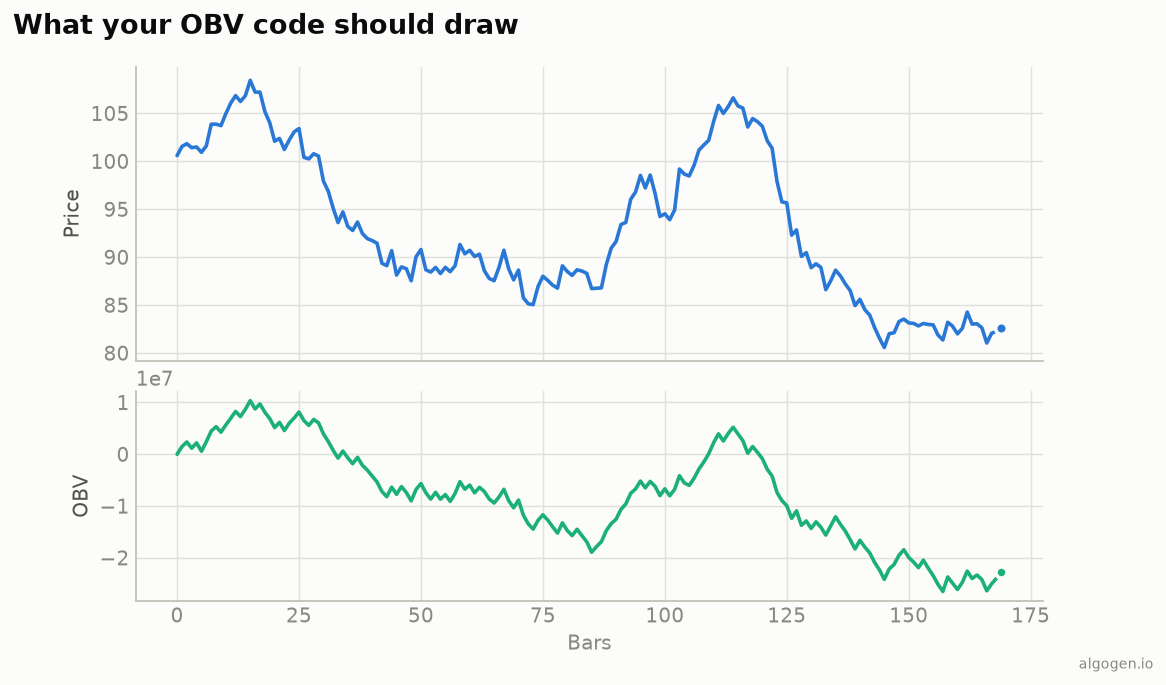
OBV is about the simplest NinjaScript indicator you can write — a running total that reads its own previous value. See the explainer for the rule.
What you’ll need
- NinjaTrader 8
- New → NinjaScript Editor → Indicators → New Indicator, name it
AlgoGenOBV
The source
#region Using declarations
using System;
using System.Windows.Media;
using NinjaTrader.NinjaScript;
using NinjaTrader.NinjaScript.Indicators;
#endregion

namespace NinjaTrader.NinjaScript.Indicators
{
    public class AlgoGenOBV : Indicator
    {
        protected override void OnStateChange()
        {
            if (State == State.SetDefaults)
            {
                Name        = "AlgoGen OBV";
                Description = "On-Balance Volume (Granville)";
                IsOverlay   = false;

                AddPlot(new Stroke(Brushes.MediumSeaGreen, 2), PlotStyle.Line, "OBV");
            }
        }

        protected override void OnBarUpdate()
        {
            if (CurrentBar == 0)
            {
                Value[0] = 0;
                return;
            }

            double vol = Volume[0];
            if (Close[0] > Close[1])
                Value[0] = Value[1] + vol;
            else if (Close[0] < Close[1])
                Value[0] = Value[1] - vol;
            else
                Value[0] = Value[1];
        }
    }
}
Compile & apply
- Press F5 to compile.
- Add AlgoGen OBV to a chart; it draws in its own panel, matching the output
chart. Add a moving average of it (or the built-in
SMA(OBV(), 20)) for a signal line.
Gotchas
Value[1]is the running total. Reading your own prior plotted value is what makes the accumulation work; no separate field needed.- Volume type. On instruments/data series without real volume,
Volume[0]may be tick counts. OBV only means something where volume is meaningful. - Bar-0 seed. Start at 0 on the first bar; everything after builds on it. The absolute level is arbitrary — read the line’s direction, not its value.
- Add a signal line. In a strategy, compare OBV to a smoothed version of itself for tradeable crossovers rather than acting on the raw total:
// In a strategy's OnBarUpdate, using the built-in OBV() and SMA():
if (CrossAbove(OBV(), SMA(OBV(), 20), 1))
    EnterLong();
else if (CrossBelow(OBV(), SMA(OBV(), 20), 1))
    EnterShort();
- Volume type. On Renko/range bars or synthetic series,
Volume[0]semantics vary — confirm you’re feeding OBV real traded volume before reading anything into divergences.
That’s the five-language set: Python, MQL5, Pine Script, EasyLanguage, and this one. Now check whether OBV confirms your entries in AlgoGen.
This post is educational, not financial advice. Indicators describe the past; they don’t predict the future. Backtest anything before you risk real money on it.
Sources and further reading
- New Key to Stock Market Profits (Google Books)
- NinjaScript system indicator methods (NinjaTrader)