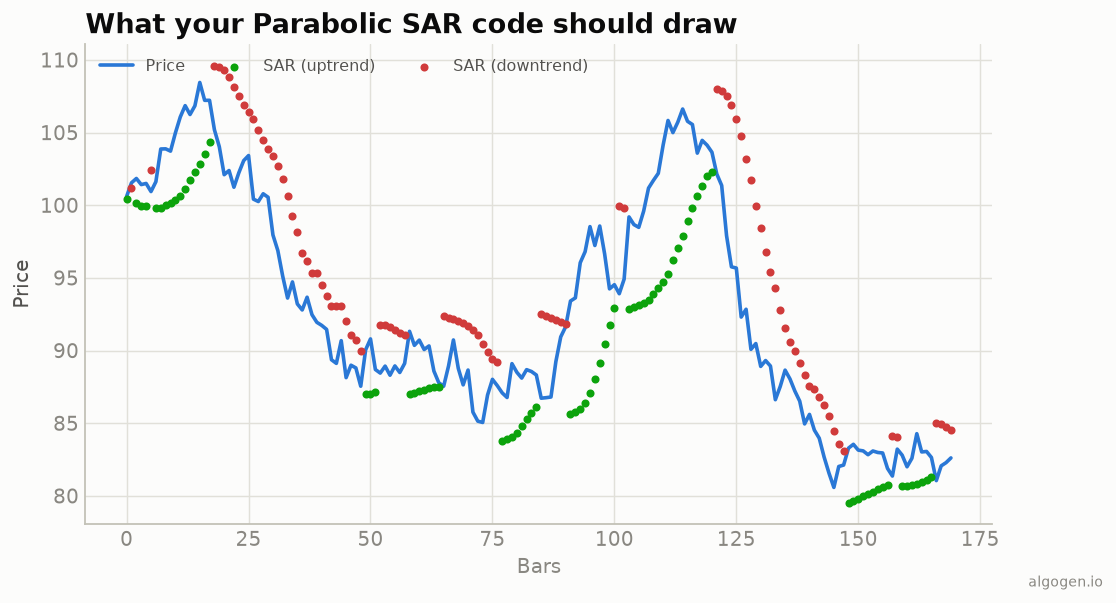
Given the Parabolic SAR’s recursive state machine (see
the explainer), NinjaTrader’s built-in
ParabolicSAR is the reliable building block. Here’s a thin wrapper that colours
the dots and exposes flips, plus notes for rolling your own.
What you’ll need
- NinjaTrader 8
- New → NinjaScript Editor → Indicators → New Indicator, name it
AlgoGenSAR
The source
#region Using declarations
using System;
using System.Windows.Media;
using NinjaTrader.NinjaScript;
using NinjaTrader.NinjaScript.Indicators;
#endregion

namespace NinjaTrader.NinjaScript.Indicators
{
    public class AlgoGenSAR : Indicator
    {
        protected override void OnStateChange()
        {
            if (State == State.SetDefaults)
            {
                Name        = "AlgoGen Parabolic SAR";
                Description = "Wilder Parabolic SAR (dots)";
                Acceleration = 0.02; AccelMax = 0.20; AccelStep = 0.02;
                IsOverlay   = true;

                AddPlot(new Stroke(Brushes.DimGray, 2), PlotStyle.Dot, "Sar");
            }
        }

        protected override void OnBarUpdate()
        {
            double sar = ParabolicSAR(Acceleration, AccelMax, AccelStep)[0];
            Sar[0] = sar;
            // Colour the dot by side of price.
            PlotBrushes[0][0] = sar < Close[0] ? Brushes.MediumSeaGreen : Brushes.IndianRed;
        }

        #region Properties
        [NinjaScriptProperty][System.ComponentModel.DataAnnotations.Range(0.0001, double.MaxValue)]
        [System.ComponentModel.Display(Name = "Acceleration", GroupName = "Parameters", Order = 0)]
        public double Acceleration { get; set; }

        [NinjaScriptProperty][System.ComponentModel.DataAnnotations.Range(0.0001, double.MaxValue)]
        [System.ComponentModel.Display(Name = "AccelMax", GroupName = "Parameters", Order = 1)]
        public double AccelMax { get; set; }

        [NinjaScriptProperty][System.ComponentModel.DataAnnotations.Range(0.0001, double.MaxValue)]
        [System.ComponentModel.Display(Name = "AccelStep", GroupName = "Parameters", Order = 2)]
        public double AccelStep { get; set; }

        [Gui.Browsable(false)][System.Xml.Serialization.XmlIgnore]
        public Series<double> Sar => Values[0];
        #endregion
    }
}
Using it for flips and stops
// In a strategy's OnBarUpdate:
double sar = ParabolicSAR(0.02, 0.2, 0.02)[0];
if (sar < Close[0] && ParabolicSAR(0.02, 0.2, 0.02)[1] >= Close[1])
    EnterLong();            // SAR flipped below price
else if (sar > Close[0] && ParabolicSAR(0.02, 0.2, 0.02)[1] <= Close[1])
    EnterShort();
// Or use `sar` directly as a trailing SetStopLoss level.
The algorithm, if you build from scratch
The from-scratch logic matches the Python post
exactly: track direction, extreme point, and acceleration factor; step SAR += AF·(EP − SAR); clamp out of the prior two bars’ range; flip on a price cross,
reseeding SAR at the old EP and resetting AF. Because that’s a stateful loop,
reusing the built-in ParabolicSAR avoids subtle bugs.
Gotchas
PlotStyle.Dot. Draws the classic dotted SAR; a line style misrepresents it.- Parameter order.
ParabolicSAR(acceleration, accelerationMax, accelerationStep)— check the argument order in your NinjaTrader version’s reference. - Trailing stop. The cleanest real use is
SetStopLoss/ExitLongStopMarketat the SAR level, ratcheting only in your favor.
That’s the five-language set: Python, MQL5, Pine Script, EasyLanguage, and this one. Now test a SAR trailing stop in AlgoGen.
This post is educational, not financial advice. Indicators describe the past; they don’t predict the future. Backtest anything before you risk real money on it.
Sources and further reading
- NinjaScript system indicator methods (NinjaTrader)