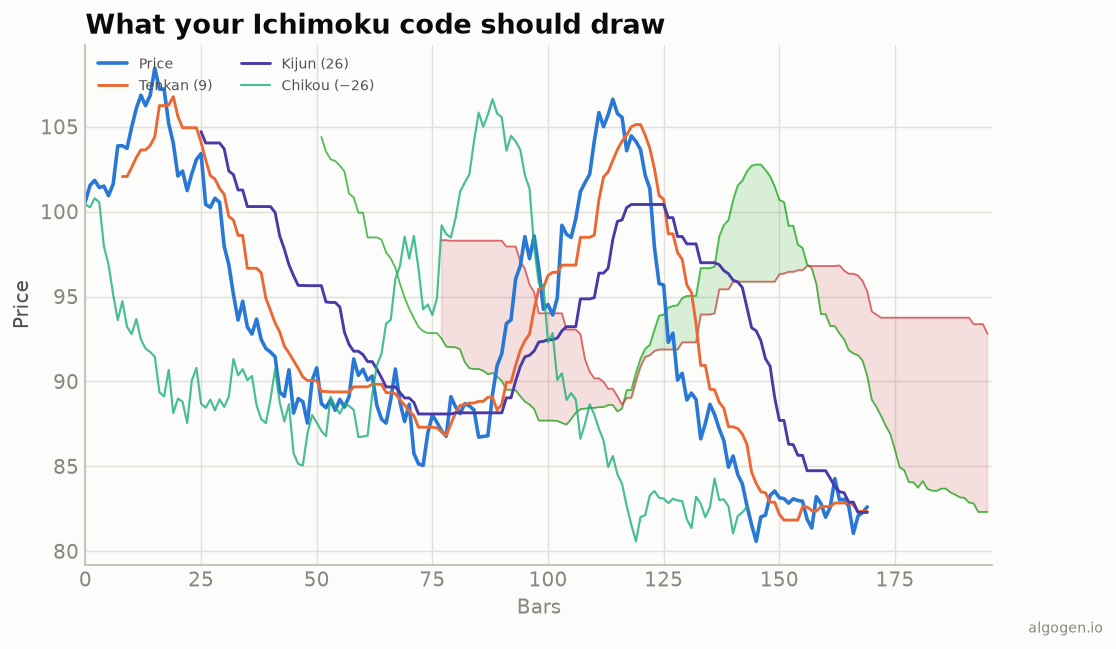
Ichimoku in NinjaScript is mostly midpoint math, with the wrinkle that plotting a line into the future isn’t something a normal plot does — so we compute all five lines and handle displacement with plot offsets. See the explainer for the components.
What you’ll need
- NinjaTrader 8
- New → NinjaScript Editor → Indicators → New Indicator, name it
AlgoGenIchimoku
The source
#region Using declarations
using System;
using System.Windows.Media;
using NinjaTrader.NinjaScript;
using NinjaTrader.NinjaScript.Indicators;
#endregion

namespace NinjaTrader.NinjaScript.Indicators
{
    public class AlgoGenIchimoku : Indicator
    {
        protected override void OnStateChange()
        {
            if (State == State.SetDefaults)
            {
                Name        = "AlgoGen Ichimoku";
                Description = "Ichimoku Kinko Hyo";
                Tenkan = 9; Kijun = 26; SenkouBLen = 52; Displacement = 26;
                IsOverlay = true;

                AddPlot(new Stroke(Brushes.OrangeRed, 2), PlotStyle.Line, "TenkanLine");
                AddPlot(new Stroke(Brushes.MediumPurple, 2), PlotStyle.Line, "KijunLine");
                AddPlot(new Stroke(Brushes.MediumSeaGreen, 1), PlotStyle.Line, "SenkouA");
                AddPlot(new Stroke(Brushes.IndianRed, 1), PlotStyle.Line, "SenkouB");
                AddPlot(new Stroke(Brushes.SeaGreen, 1), PlotStyle.Line, "Chikou");
            }
        }

        private double Mid(int len)
        {
            double hh = High[0], ll = Low[0];
            for (int i = 1; i < len; i++)
            {
                if (High[i] > hh) hh = High[i];
                if (Low[i]  < ll) ll = Low[i];
            }
            return (hh + ll) / 2.0;
        }

        protected override void OnBarUpdate()
        {
            if (CurrentBar < SenkouBLen) return;

            double tenkan = Mid(Tenkan);
            double kijun  = Mid(Kijun);
            TenkanLine[0] = tenkan;
            KijunLine[0]  = kijun;

            // Senkou spans: value computed now, displayed Displacement bars FORWARD.
            SenkouA[0] = (tenkan + kijun) / 2.0;
            SenkouB[0] = Mid(SenkouBLen);

            // Chikou: current close displayed Displacement bars BACK.
            Chikou[0] = Close[0];
        }

        #region Properties
        [NinjaScriptProperty][System.ComponentModel.DataAnnotations.Range(1,int.MaxValue)]
        public int Tenkan { get; set; }
        [NinjaScriptProperty][System.ComponentModel.DataAnnotations.Range(1,int.MaxValue)]
        public int Kijun { get; set; }
        [NinjaScriptProperty][System.ComponentModel.DataAnnotations.Range(1,int.MaxValue)]
        public int SenkouBLen { get; set; }
        [NinjaScriptProperty][System.ComponentModel.DataAnnotations.Range(0,int.MaxValue)]
        public int Displacement { get; set; }

        [Gui.Browsable(false)][System.Xml.Serialization.XmlIgnore] public Series<double> TenkanLine => Values[0];
        [Gui.Browsable(false)][System.Xml.Serialization.XmlIgnore] public Series<double> KijunLine  => Values[1];
        [Gui.Browsable(false)][System.Xml.Serialization.XmlIgnore] public Series<double> SenkouA    => Values[2];
        [Gui.Browsable(false)][System.Xml.Serialization.XmlIgnore] public Series<double> SenkouB    => Values[3];
        [Gui.Browsable(false)][System.Xml.Serialization.XmlIgnore] public Series<double> Chikou     => Values[4];
        #endregion
    }
}
Handling the displacement
The code computes the correct values; displaying them shifted is the last step.
In NinjaTrader you set a plot’s displacement with Plots[index].Displacement:
// In State.Configure, after the AddPlot calls:
Plots[2].Displacement =  Displacement;   // Senkou A forward
Plots[3].Displacement =  Displacement;   // Senkou B forward
Plots[4].Displacement = -Displacement;   // Chikou back
Gotchas
- Compute now, display shifted. Don’t try to write future values into
[0]— compute the span value on the current bar and let the plot’sDisplacementpush it forward; use a negative displacement for the Chikou. - The cloud fill. NinjaTrader can shade between two plots with
Drawregions or aPlotStylefill; the exact approach depends on your version, but the two span values above are what you fill between. - Warm-up. Guard
CurrentBar < SenkouBLenso the 52-period midpoint has data.
That’s the five-language set: Python, MQL5, Pine Script, EasyLanguage, and this one. Now test an Ichimoku system in AlgoGen.
This post is educational, not financial advice. Indicators describe the past; they don’t predict the future. Backtest anything before you risk real money on it.
Sources and further reading
- Ichimoku: At a Glance (CMT Association)
- NinjaScript system indicator methods (NinjaTrader)