The EMA in NinjaScript is barely longer than the SMA — a
single recurrence in OnBarUpdate — but it introduces the pattern of referencing
your own prior output, which you’ll use constantly. See
the explainer for the concept.
What you’ll need
- NinjaTrader 8
- New → NinjaScript Editor → Indicators → New Indicator, name it
AlgoGenEMA
The source
#region Using declarations
using System;
using System.Windows.Media;
using NinjaTrader.NinjaScript;
using NinjaTrader.NinjaScript.Indicators;
#endregion

namespace NinjaTrader.NinjaScript.Indicators
{
    public class AlgoGenEMA : Indicator
    {
        private double alpha;
        private double runningSum;

        protected override void OnStateChange()
        {
            if (State == State.SetDefaults)
            {
                Name        = "AlgoGen EMA";
                Description = "Exponential Moving Average";
                Period      = 20;
                IsOverlay   = true;

                AddPlot(new Stroke(Brushes.OrangeRed, 2), PlotStyle.Line, "EMA");
            }
            else if (State == State.Configure)
            {
                alpha = 2.0 / (Period + 1.0);
                runningSum = 0;
            }
        }

        protected override void OnBarUpdate()
        {
            if (CurrentBar < Period - 1)
            {
                // Accumulate the SMA seed over the first window.
                runningSum += Close[0];
                if (CurrentBar == Period - 2)
                    return;                       // still filling the seed window
            }

            if (CurrentBar == Period - 1)
            {
                runningSum += Close[0];
                Value[0] = runningSum / Period;   // seed with SMA of first window
            }
            else if (CurrentBar >= Period)
            {
                Value[0] = alpha * Close[0] + (1 - alpha) * Value[1];
            }
        }

        #region Properties
        [NinjaScriptProperty]
        [System.ComponentModel.DataAnnotations.Range(1, int.MaxValue)]
        [System.ComponentModel.Display(Name = "Period", GroupName = "Parameters", Order = 0)]
        public int Period { get; set; }
        #endregion
    }
}
Compile & apply
- Press F5 to compile.
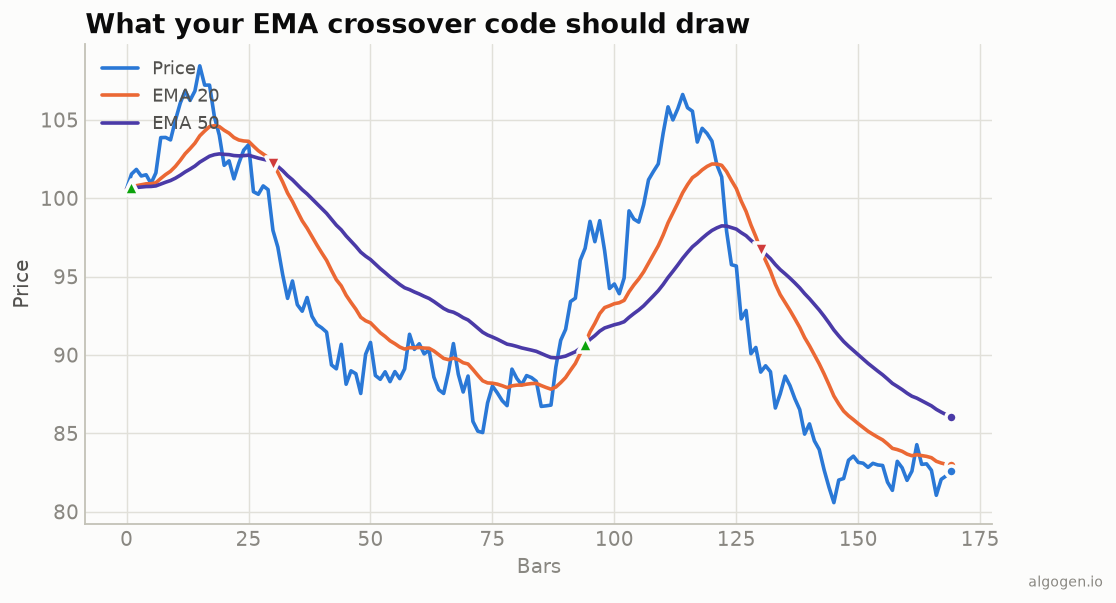
- Add AlgoGen EMA to a chart, set the period. Because
IsOverlay = true, it draws on price, matching the orange EMA in the output chart.
Gotchas
- Seed then recurse. We accumulate an SMA over the first
Periodbars to seedValue[0], then switch to theα·Close + (1−α)·Value[1]recurrence. This matches NinjaTrader’s built-in EMA convention. Value[1]is the prior EMA. Referencing your own previous plotted value is the idiom that makes recursive indicators work in NinjaScript.- Built-in shortcut.
EMA(Close, Period)[0]exists; rolling your own is for learning and full control. State.Configureforalpha. Computingalphaonce inConfigure(rather than every bar inOnBarUpdate) is a small efficiency habit worth forming — it only depends onPeriod, which can’t change mid-run.- Don’t reset
Valueon reload. Because the recurrence readsValue[1], NinjaTrader’s historical processing rebuilds it correctly bar by bar; you don’t need to persist anything yourself beyond the plotted series.
That’s the five-language set: Python, MQL5, Pine Script, EasyLanguage, and this one. Now compare EMA vs SMA on real data in AlgoGen.
This post is educational, not financial advice. Indicators describe the past; they don’t predict the future. Backtest anything before you risk real money on it.
Sources and further reading
- Statistical Forecasting for Inventory Control (Royal Statistical Society and Oxford Academic)
- NinjaScript system indicator methods (NinjaTrader)