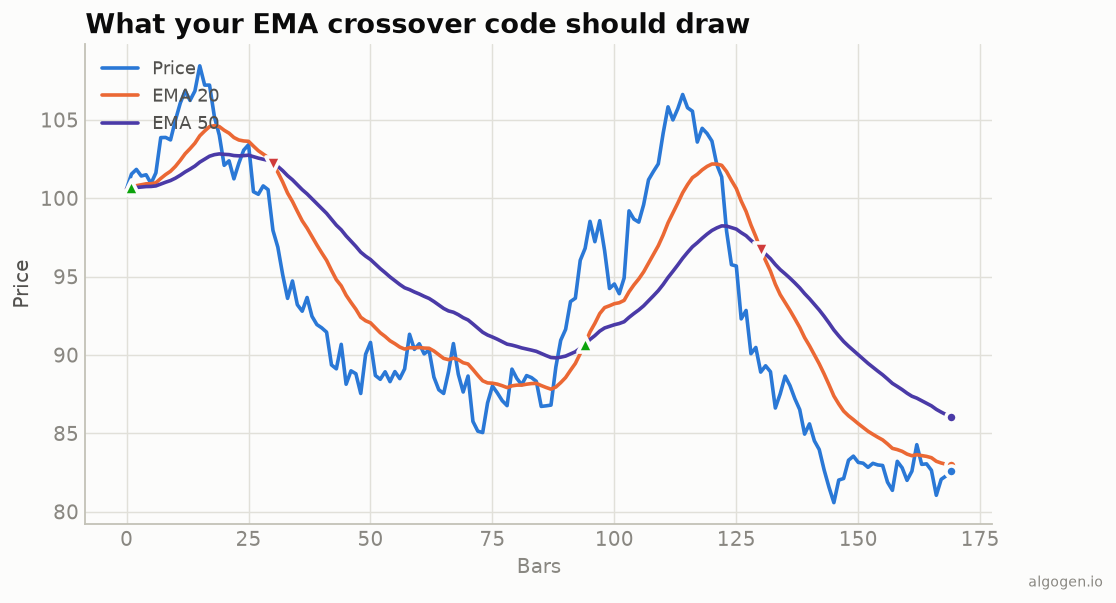
Writing your own EMA in MQL5 is a great follow-up to the SMA indicator — same overlay setup, but now with a recurrence and a seed to get right. See the explainer for the concept.
What you’ll need
- MetaTrader 5 with MetaEditor
- Save as
AlgoGen.EMA.mq5underMQL5/Indicators/
The source
We seed the recursion with a simple average of the first window (the convention
MT5’s own EMA uses), then apply the α = 2/(period+1) update.
//+------------------------------------------------------------------+
//|                                                  AlgoGen.EMA.mq5 |
//|                                          Copyright 2026, AlgoGen |
//|                                           https://www.algogen.io |
//+------------------------------------------------------------------+
#property copyright "Copyright 2026, AlgoGen"
#property link      "https://www.algogen.io"
#property version   "1.00"
#property indicator_chart_window
#property indicator_buffers 1
#property indicator_plots   1

#property indicator_label1  "EMA"
#property indicator_type1   DRAW_LINE
#property indicator_color1  clrOrangeRed
#property indicator_width1  2

input int InpPeriod = 20; // EMA period

double EMABuffer[];

int OnInit()
  {
   SetIndexBuffer(0, EMABuffer, INDICATOR_DATA);
   PlotIndexSetInteger(0, PLOT_DRAW_BEGIN, InpPeriod - 1);
   IndicatorSetString(INDICATOR_SHORTNAME, "AlgoGen EMA(" + (string)InpPeriod + ")");
   return(INIT_SUCCEEDED);
  }

int OnCalculate(const int rates_total, const int prev_calculated,
                const datetime &time[], const double &open[],
                const double &high[],   const double &low[],
                const double &close[],  const long &tick_volume[],
                const long &volume[],   const int &spread[])
  {
   if(rates_total < InpPeriod)
      return(0);

   double alpha = 2.0 / (InpPeriod + 1.0);

   if(prev_calculated == 0)
     {
      // Seed with an SMA of the first window.
      double sum = 0.0;
      for(int j = 0; j < InpPeriod; j++)
         sum += close[j];
      EMABuffer[InpPeriod - 1] = sum / InpPeriod;

      for(int i = InpPeriod; i < rates_total; i++)
         EMABuffer[i] = alpha * close[i] + (1.0 - alpha) * EMABuffer[i - 1];
     }
   else
     {
      for(int i = prev_calculated - 1; i < rates_total; i++)
         EMABuffer[i] = alpha * close[i] + (1.0 - alpha) * EMABuffer[i - 1];
     }
   return(rates_total);
  }
//+------------------------------------------------------------------+
Install & compile
- Drop it in
MQL5/Indicators/, press F7. - Drag onto a chart and set the period — the orange EMA overlays price, matching the output chart.
Gotchas
- The seed. We start the recursion from an SMA of the first
InpPeriodbars, which matches MT5’s built-in EMA. Seeding fromclose[0]instead is also valid but will differ slightly early on. - Incremental updates. The
prev_calculatedbranch continues the recursion from the last computed bar each tick, rather than recomputing history. - Built-in shortcut / MQL4. In an EA use
iMA(..., MODE_EMA, ...). In MQL4 the same recurrence applies; swap theOnCalculatesignature and buffer setup.
Same indicator elsewhere: Python, Pine Script, EasyLanguage, NinjaScript. Then backtest it in AlgoGen.
This post is educational, not financial advice. Indicators describe the past; they don’t predict the future. Backtest anything before you risk real money on it.
Sources and further reading
- Statistical Forecasting for Inventory Control (Royal Statistical Society and Oxford Academic)
- Technical indicator functions (MetaQuotes)