MetaTrader ships a moving average, but building your own SMA is the best possible
first custom indicator: the math is trivial, so you can focus on learning how
MT5’s buffer-and-OnCalculate machinery actually works. Then you own a component
you can wire into an Expert Advisor. See the explainer for
what we’re computing.
What you’ll need
- MetaTrader 5 with MetaEditor
- Save as
AlgoGen.SMA.mq5underMQL5/Indicators/
The source
This draws the SMA directly on the price chart (indicator_chart_window) and
computes the average by hand with the running-sum trick, so you can see there’s
no library doing anything mysterious.
//+------------------------------------------------------------------+
//|                                                  AlgoGen.SMA.mq5 |
//|                                          Copyright 2026, AlgoGen |
//|                                           https://www.algogen.io |
//+------------------------------------------------------------------+
#property copyright "Copyright 2026, AlgoGen"
#property link      "https://www.algogen.io"
#property version   "1.00"
#property indicator_chart_window
#property indicator_buffers 1
#property indicator_plots   1

#property indicator_label1  "SMA"
#property indicator_type1   DRAW_LINE
#property indicator_color1  clrOrangeRed
#property indicator_width1  2

input int InpPeriod = 20; // SMA period

double SMABuffer[];

int OnInit()
  {
   SetIndexBuffer(0, SMABuffer, INDICATOR_DATA);
   PlotIndexSetInteger(0, PLOT_DRAW_BEGIN, InpPeriod - 1);
   IndicatorSetString(INDICATOR_SHORTNAME, "AlgoGen SMA(" + (string)InpPeriod + ")");
   return(INIT_SUCCEEDED);
  }

int OnCalculate(const int rates_total,
                const int prev_calculated,
                const datetime &time[],
                const double &open[],
                const double &high[],
                const double &low[],
                const double &close[],
                const long &tick_volume[],
                const long &volume[],
                const int &spread[])
  {
   if(rates_total < InpPeriod)
      return(0);

   int start = (prev_calculated > InpPeriod) ? prev_calculated - 1 : InpPeriod - 1;

   for(int i = start; i < rates_total; i++)
     {
      double sum = 0.0;
      for(int j = 0; j < InpPeriod; j++)
         sum += close[i - j];
      SMABuffer[i] = sum / InpPeriod;
     }
   return(rates_total);
  }
//+------------------------------------------------------------------+
Install & compile
- Drop
AlgoGen.SMA.mq5inMQL5/Indicators/. - Press F7 in MetaEditor to compile — zero errors.
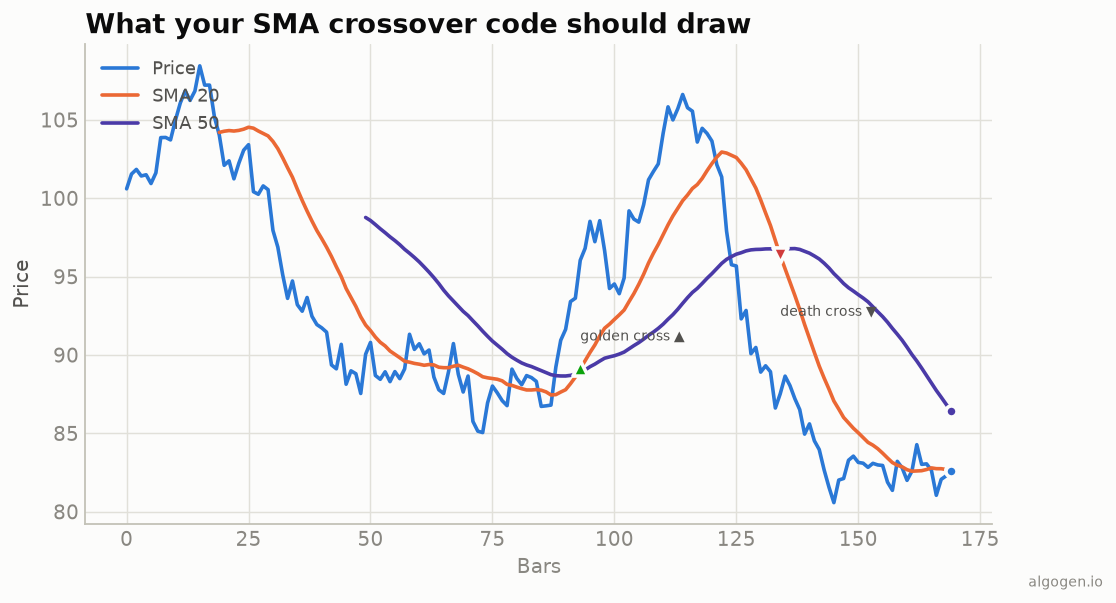
- Drag it onto a chart from the Navigator and set the period. It overlays the price, matching the orange SMA in the output chart above.
Gotchas
PLOT_DRAW_BEGIN. Setting it toInpPeriod - 1tells MT5 not to draw the line until the window is full, avoiding a misleading partial average at the far left.- The built-in shortcut. In an Expert Advisor you’d usually just call
iMA(_Symbol, _Period, InpPeriod, 0, MODE_SMA, PRICE_CLOSE)and read the handle withCopyBuffer. The hand-rolled loop above is for understanding and for full control of the plot. - MQL4? Same math. Use the MQL4
OnCalculateform, declare the buffer withSetIndexBuffer(0, SMABuffer)andSetIndexStyle(0, DRAW_LINE)inOnInit, and either loop as above or calliMA(...).
Same indicator elsewhere: Python, Pine Script, EasyLanguage, NinjaScript. Then backtest an SMA rule in AlgoGen.
This post is educational, not financial advice. Indicators describe the past; they don’t predict the future. Backtest anything before you risk real money on it.
Sources and further reading
- Gartley and the early use of moving averages (CMT Association)
- Technical indicator functions (MetaQuotes)