Pine Script’s ta.ema gives you the exponential moving average in one call, and
building it by hand is a nice illustration of Pine’s [1] history access. Here’s
the EMA crossover from the explainer, plus a bonus EMA
ribbon.
What you’ll need
- A TradingView account (free tier is fine)
- The Pine Editor
The source
//@version=5
indicator("AlgoGen EMA Crossover", shorttitle="AG EMA", overlay=true)

fastLen = input.int(20, "Fast EMA", minval=1)
slowLen = input.int(50, "Slow EMA", minval=1)

fast = ta.ema(close, fastLen)
slow = ta.ema(close, slowLen)

plot(fast, "Fast EMA", color=#eb6834, linewidth=2)
plot(slow, "Slow EMA", color=#4a3aa7, linewidth=2)

plotshape(ta.crossover(fast, slow),  "Bull", shape.triangleup,   location.belowbar, color=#0ca30c, size=size.small)
plotshape(ta.crossunder(fast, slow), "Bear", shape.triangledown, location.abovebar, color=#d03b3b, size=size.small)
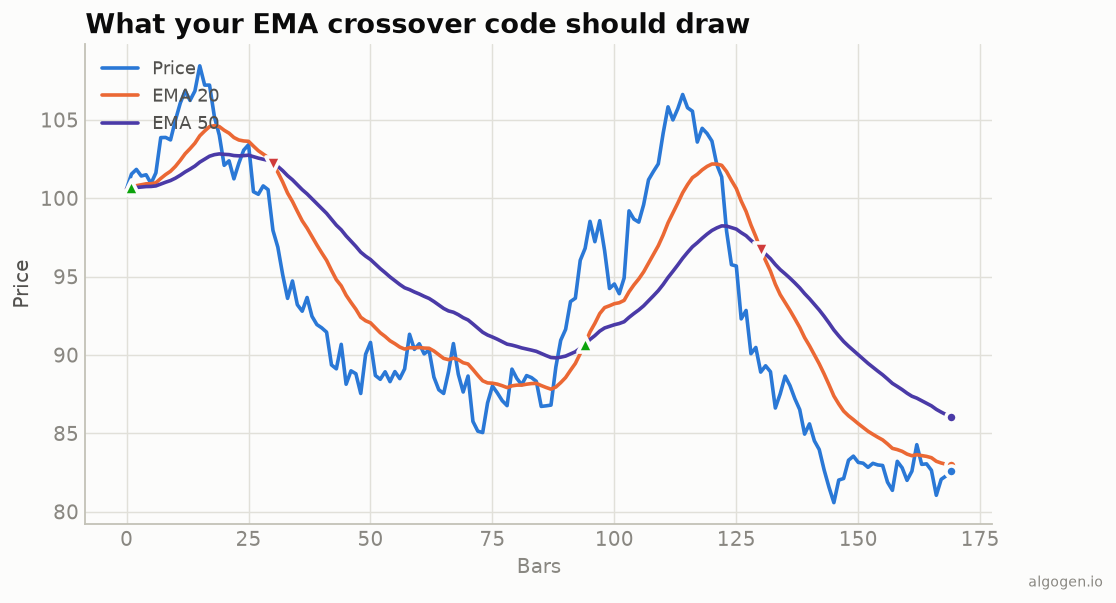
ta.ema(close, len) is the recurrence α·close + (1−α)·ema[1] with α = 2/(len+1) — the same math as every version in this series. The plotshape calls
mark the crossovers you see in the output chart.
The manual version
To see the recurrence explicitly, Pine lets you reference the indicator’s own prior value:
//@version=5
indicator("AlgoGen EMA (manual)", overlay=true)
len = input.int(20, "Length")
var float e = na
alpha = 2.0 / (len + 1)
e := na(e) ? ta.sma(close, len) : alpha * close + (1 - alpha) * e
plot(e, color=#eb6834, linewidth=2)
Here we seed e with an SMA on the first valid bar, then apply the recurrence —
e := reassigns the var each bar.
Bonus: an EMA ribbon
//@version=5
indicator("AlgoGen EMA Ribbon", overlay=true)
plot(ta.ema(close, 8),  color=#2a78d6)
plot(ta.ema(close, 13), color=#1baf7a)
plot(ta.ema(close, 21), color=#eda100)
plot(ta.ema(close, 34), color=#eb6834)
A stack of EMAs fanning out signals a strong trend; tangling together signals chop. Cheap and surprisingly readable.
Crossover alerts
alertcondition(ta.crossover(fast, slow),  "EMA bull cross", "Fast EMA crossed above slow EMA")
alertcondition(ta.crossunder(fast, slow), "EMA bear cross", "Fast EMA crossed below slow EMA")
Add these to the crossover script, then right-click the chart → Add alert and pick
the condition. Gate on barstate.isconfirmed in a strategy if you only want to
act on closed bars — an EMA’s speed cuts both ways, and intrabar signals flip-flop
more than an SMA’s would.
Gotchas
varfor the manual recurrence. Withoutvar,eresets every bar and the recurrence breaks.- Seeding.
ta.emaand the manual SMA-seed version can differ by a hair in the first bars — normal.
Same indicator elsewhere: Python, MQL5, EasyLanguage, NinjaScript. Then test an EMA rule in AlgoGen.
This post is educational, not financial advice. Indicators describe the past; they don’t predict the future. Backtest anything before you risk real money on it.
Sources and further reading
- Statistical Forecasting for Inventory Control (Royal Statistical Society and Oxford Academic)
- Pine Script built-ins (TradingView)