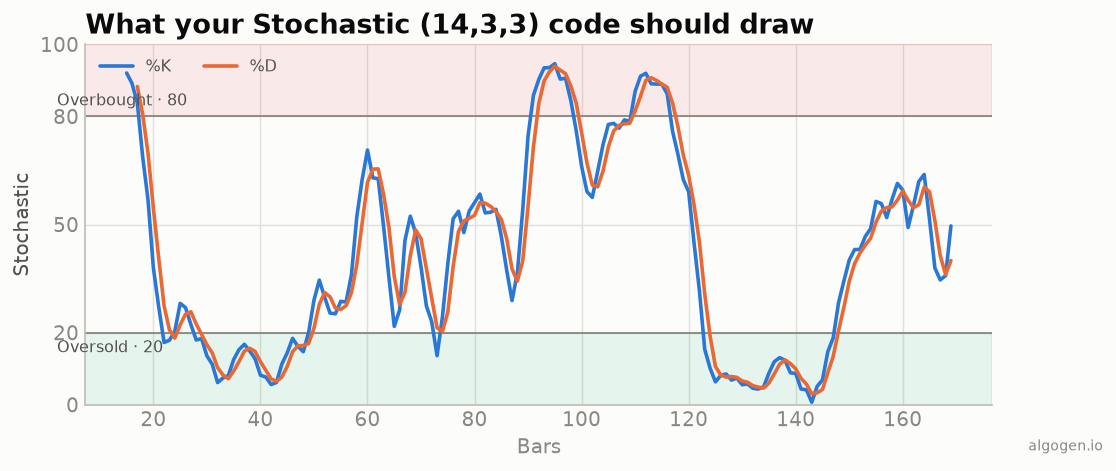
The stochastic in NinjaScript brings together patterns from the earlier posts: rolling highs and lows like Donchian-style range logic, plus chained smoothing like the MACD. See the explainer for the concept.
What you’ll need
- NinjaTrader 8
- New → NinjaScript Editor → Indicators → New Indicator, name it
AlgoGenStochastic
The source
We keep raw %K and slow %K as Series<double> so the smoothing chains correctly.
#region Using declarations
using System;
using System.Windows.Media;
using NinjaTrader.NinjaScript;
using NinjaTrader.NinjaScript.Indicators;
#endregion

namespace NinjaTrader.NinjaScript.Indicators
{
    public class AlgoGenStochastic : Indicator
    {
        private Series<double> rawK;
        private Series<double> slowK;

        protected override void OnStateChange()
        {
            if (State == State.SetDefaults)
            {
                Name        = "AlgoGen Stochastic";
                Description = "Slow stochastic %K and %D";
                KLen = 14; Smooth = 3; DLen = 3;
                IsOverlay = false;

                AddPlot(new Stroke(Brushes.DodgerBlue, 2), PlotStyle.Line, "K");
                AddPlot(new Stroke(Brushes.OrangeRed, 2),  PlotStyle.Line, "D");
                AddLine(Brushes.Gray, 80, "Overbought");
                AddLine(Brushes.Gray, 20, "Oversold");
            }
            else if (State == State.DataLoaded)
            {
                rawK  = new Series<double>(this);
                slowK = new Series<double>(this);
            }
        }

        private static double Sma(Series<double> s, int period, int currentBar)
        {
            if (currentBar < period - 1) return double.NaN;
            double sum = 0.0;
            for (int i = 0; i < period; i++) sum += s[i];
            return sum / period;
        }

        protected override void OnBarUpdate()
        {
            if (CurrentBar < KLen - 1)
                return;

            double hh = High[0], ll = Low[0];
            for (int i = 1; i < KLen; i++)
            {
                if (High[i] > hh) hh = High[i];
                if (Low[i]  < ll) ll = Low[i];
            }
            double range = hh - ll;
            rawK[0] = range == 0.0 ? 50.0 : 100.0 * (Close[0] - ll) / range;

            slowK[0] = Sma(rawK, Smooth, CurrentBar);
            K[0]     = slowK[0];
            D[0]     = Sma(slowK, DLen, CurrentBar);
        }

        #region Properties
        [NinjaScriptProperty] [System.ComponentModel.DataAnnotations.Range(1, int.MaxValue)]
        [System.ComponentModel.Display(Name = "KLen", GroupName = "Parameters", Order = 0)]
        public int KLen { get; set; }

        [NinjaScriptProperty] [System.ComponentModel.DataAnnotations.Range(1, int.MaxValue)]
        [System.ComponentModel.Display(Name = "Smooth", GroupName = "Parameters", Order = 1)]
        public int Smooth { get; set; }

        [NinjaScriptProperty] [System.ComponentModel.DataAnnotations.Range(1, int.MaxValue)]
        [System.ComponentModel.Display(Name = "DLen", GroupName = "Parameters", Order = 2)]
        public int DLen { get; set; }

        [Gui.Browsable(false)] [System.Xml.Serialization.XmlIgnore]
        public Series<double> K => Values[0];
        [Gui.Browsable(false)] [System.Xml.Serialization.XmlIgnore]
        public Series<double> D => Values[1];
        #endregion
    }
}
Compile & apply
- Press F5 to compile.
- Add AlgoGen Stochastic to a chart; it draws in its own panel with the 20/80 lines, matching the output chart.
Gotchas
- Flat-range guard.
range == 0.0 ? 50.0prevents a divide-by-zero on a perfectly flat window. - Chained
Series.rawKandslowKareSeries<double>so[i]look-backs work across the smoothing stages and survive reloads. - Warm-up. The
Smahelper returnsNaNuntil each stage has enough bars; don’t act on those early values.
That’s the five-language set: Python, MQL5, Pine Script, EasyLanguage, and this one. Now see whether a stochastic rule holds up in AlgoGen.
This post is educational, not financial advice. Indicators describe the past; they don’t predict the future. Backtest anything before you risk real money on it.
Sources and further reading
- The Origins of the Stochastic Oscillator (CMT Association)
- NinjaScript system indicator methods (NinjaTrader)