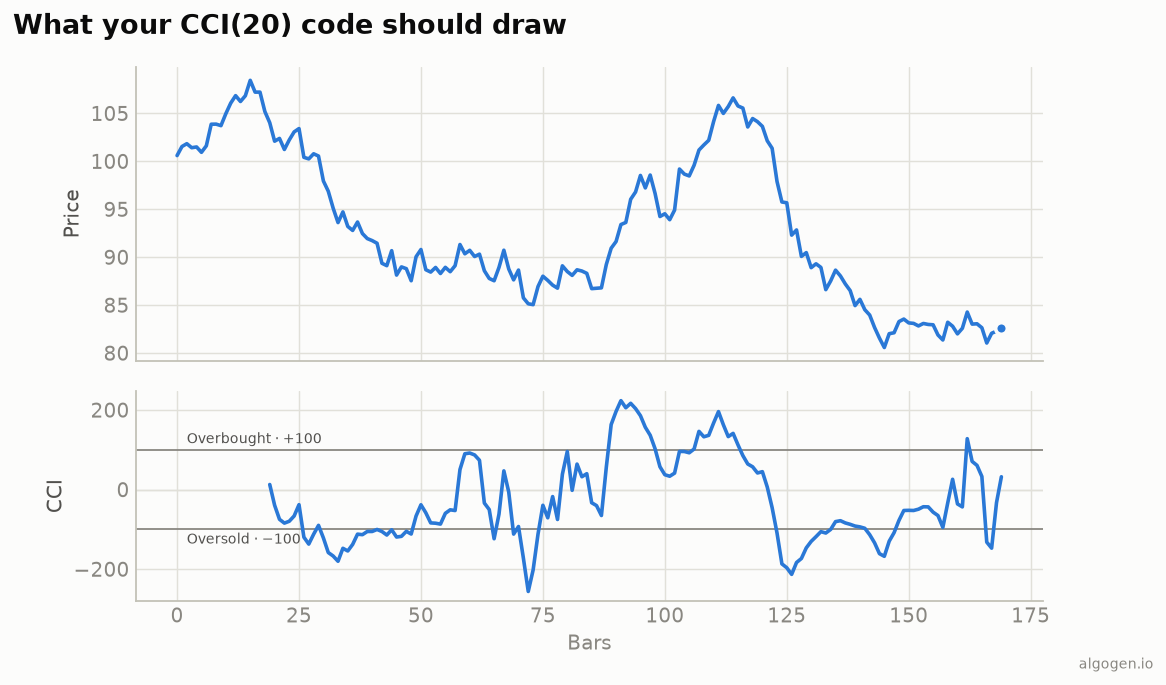
CCI in NinjaScript is a compact loop-over-the-window indicator — the only subtlety is using mean absolute deviation, not standard deviation. See the explainer for the concept.
What you’ll need
- NinjaTrader 8
- New → NinjaScript Editor → Indicators → New Indicator, name it
AlgoGenCCI
The source
#region Using declarations
using System;
using System.Windows.Media;
using NinjaTrader.NinjaScript;
using NinjaTrader.NinjaScript.Indicators;
#endregion

namespace NinjaTrader.NinjaScript.Indicators
{
    public class AlgoGenCCI : Indicator
    {
        protected override void OnStateChange()
        {
            if (State == State.SetDefaults)
            {
                Name        = "AlgoGen CCI";
                Description = "Commodity Channel Index";
                Period      = 20;
                Constant    = 0.015;
                IsOverlay   = false;

                AddPlot(new Stroke(Brushes.DodgerBlue, 2), PlotStyle.Line, "CCI");
                AddLine(Brushes.Gray, 100,  "Overbought");
                AddLine(Brushes.Gray, -100, "Oversold");
            }
        }

        protected override void OnBarUpdate()
        {
            if (CurrentBar < Period - 1)
                return;

            double tp = (High[0] + Low[0] + Close[0]) / 3.0;

            // SMA of typical price over the window.
            double sum = 0.0;
            for (int i = 0; i < Period; i++)
                sum += (High[i] + Low[i] + Close[i]) / 3.0;
            double ma = sum / Period;

            // Mean ABSOLUTE deviation of typical price from that average.
            double mad = 0.0;
            for (int i = 0; i < Period; i++)
                mad += Math.Abs((High[i] + Low[i] + Close[i]) / 3.0 - ma);
            mad /= Period;

            Value[0] = mad == 0.0 ? 0.0 : (tp - ma) / (Constant * mad);
        }

        #region Properties
        [NinjaScriptProperty][System.ComponentModel.DataAnnotations.Range(1, int.MaxValue)]
        [System.ComponentModel.Display(Name = "Period", GroupName = "Parameters", Order = 0)]
        public int Period { get; set; }

        [NinjaScriptProperty][System.ComponentModel.DataAnnotations.Range(0.0001, double.MaxValue)]
        [System.ComponentModel.Display(Name = "Constant", GroupName = "Parameters", Order = 1)]
        public double Constant { get; set; }
        #endregion
    }
}
Compile & apply
- Press F5 to compile.
- Add AlgoGen CCI to a chart; it draws in its own panel with the ±100 lines, matching the output chart.
Gotchas
- Mean absolute deviation. The second loop uses
Math.Abs, not squared terms. Using a standard-deviation helper here gives a different, non-standard indicator. - Typical price everywhere. Both the SMA and the deviation use
(H+L+C)/3, not close alone. mad == 0guard. A flat window would divide by zero; return 0.- Built-in.
CCI(Period)[0]exists; the hand-rolled version is for learning and for exposing the constant as a parameter.
That’s the five-language set: Python, MQL5, Pine Script, EasyLanguage, and this one. Now test a CCI rule in AlgoGen.
This post is educational, not financial advice. Indicators describe the past; they don’t predict the future. Backtest anything before you risk real money on it.
Sources and further reading
- NinjaScript system indicator methods (NinjaTrader)