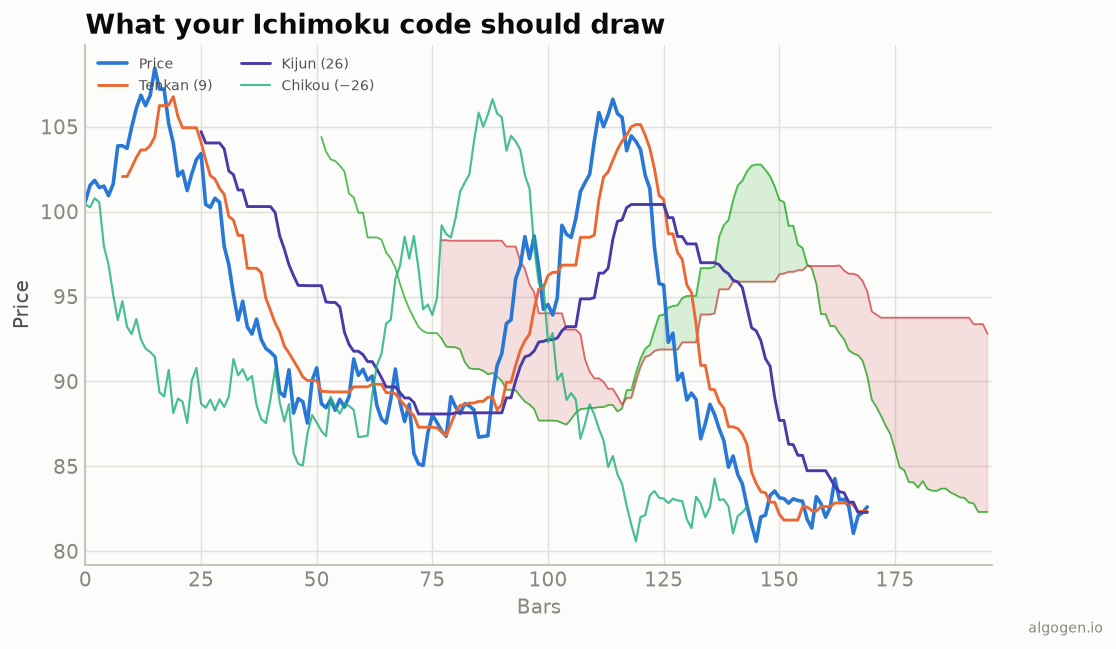
Ichimoku in EasyLanguage is a good lesson in displacement: the Senkou spans plot forward, the Chikou plots back. See the explainer for the components; here’s how to compute and plot them.
What you’ll need
- TradeStation or MultiCharts
- The EasyLanguage / PowerLanguage Editor, new Indicator
The source
{ AlgoGen Ichimoku — TradeStation / MultiCharts }
inputs:
    ConvLen( 9 ),
    BaseLen( 26 ),
    SpanBLen( 52 ),
    Disp( 26 );

variables:
    Tenkan( 0 ), Kijun( 0 ), SenkouA( 0 ), SenkouB( 0 );

Tenkan  = ( Highest( High, ConvLen )  + Lowest( Low, ConvLen ) )  / 2;
Kijun   = ( Highest( High, BaseLen )  + Lowest( Low, BaseLen ) )  / 2;
SenkouA = ( Tenkan + Kijun ) / 2;
SenkouB = ( Highest( High, SpanBLen ) + Lowest( Low, SpanBLen ) ) / 2;

Plot1( Tenkan, "Tenkan" );
Plot2( Kijun,  "Kijun" );

{ Chikou: today's close plotted Disp bars in the past }
Plot3[Disp]( Close, "Chikou" );

{ Senkou spans plotted Disp bars into the future }
Plot4[-Disp]( SenkouA, "SenkouA" );
Plot5[-Disp]( SenkouB, "SenkouB" );
Each line is the familiar (Highest + Lowest) / 2. The displacement uses
EasyLanguage’s plot-offset syntax: Plot[n] plots n bars in the past, and a
negative offset plots into the future. So Plot3[Disp] draws the Chikou back,
and Plot4[-Disp]/Plot5[-Disp] project the cloud forward.
Reading the cloud for signals
variables: CloudTop( 0 ), CloudBot( 0 );
CloudTop = MaxList( SenkouA[Disp], SenkouB[Disp] );   { the cloud under price now }
CloudBot = MinList( SenkouA[Disp], SenkouB[Disp] );

if Close > CloudTop and Tenkan crosses over Kijun then
    Alert( "Ichimoku bullish alignment" );
To compare price to the cloud currently beneath it, reference the spans that were
computed Disp bars ago (SenkouA[Disp]) — because those are the ones displaced
to line up with the current bar.
Gotchas
- Offset sign convention. In EasyLanguage
Plot[positive]is the past andPlot[negative]is the future — the opposite of what many expect. Chikou uses positive; Senkou spans use negative. - Filling the cloud between the spans requires plotting them and shading; the exact fill mechanism varies between TradeStation and MultiCharts.
- MaxBarsBack. Set it comfortably above
SpanBLen + Dispso every line and its displacement have enough history. - Built-in study. Both TradeStation and MultiCharts ship an Ichimoku indicator; the hand-built version above is for understanding the displacement and for wiring the lines into your own strategy logic, where you want direct control over the span references.
- Chikou look-ahead. When testing a Chikou rule, remember it compares today’s
close against price
Dispbars ago — never against future bars — or you’ll bake look-ahead bias into the backtest.
Same indicator elsewhere: Python, MQL5, Pine Script, NinjaScript. Then backtest it in AlgoGen.
This post is educational, not financial advice. Indicators describe the past; they don’t predict the future. Backtest anything before you risk real money on it.
Sources and further reading
- Ichimoku: At a Glance (CMT Association)
- What is EasyLanguage? (TradeStation)