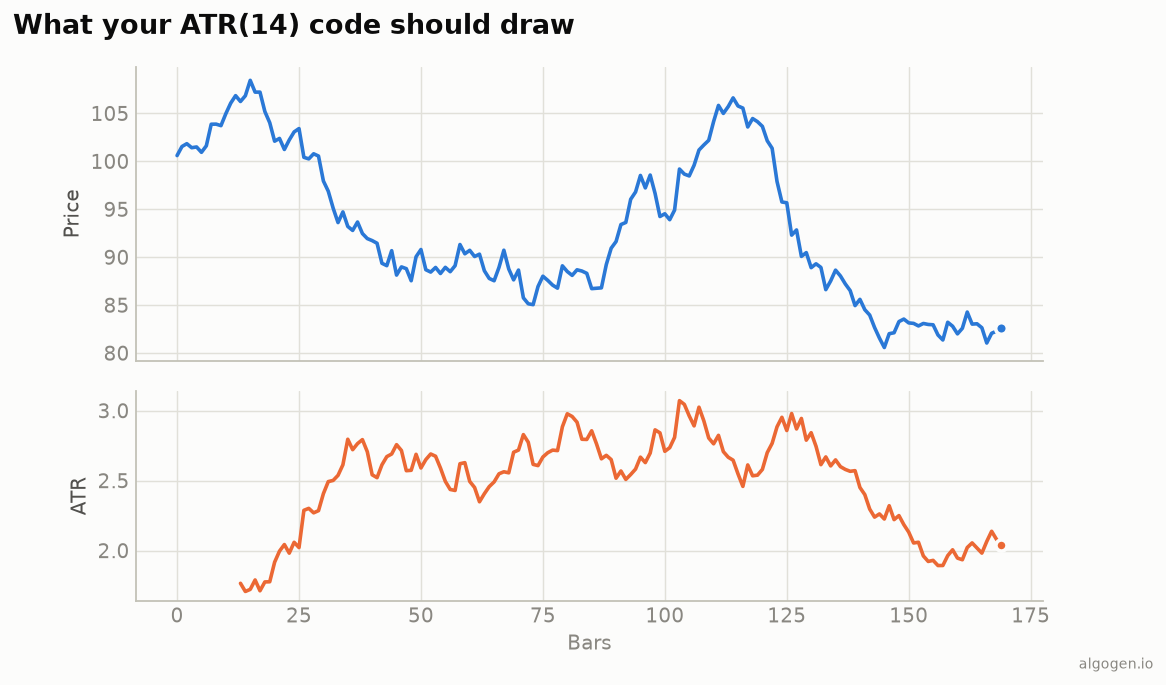
ATR in NinjaScript combines a per-bar True Range with Wilder’s recurrence — a good template for any Wilder-smoothed indicator. See the explainer for why the gap terms matter.
What you’ll need
- NinjaTrader 8
- New → NinjaScript Editor → Indicators → New Indicator, name it
AlgoGenATR
The source
#region Using declarations
using System;
using System.Windows.Media;
using NinjaTrader.NinjaScript;
using NinjaTrader.NinjaScript.Indicators;
#endregion

namespace NinjaTrader.NinjaScript.Indicators
{
    public class AlgoGenATR : Indicator
    {
        private Series<double> tr;

        protected override void OnStateChange()
        {
            if (State == State.SetDefaults)
            {
                Name        = "AlgoGen ATR";
                Description = "Average True Range (Wilder)";
                Period      = 14;
                IsOverlay   = false;

                AddPlot(new Stroke(Brushes.OrangeRed, 2), PlotStyle.Line, "ATR");
            }
            else if (State == State.DataLoaded)
            {
                tr = new Series<double>(this);
            }
        }

        protected override void OnBarUpdate()
        {
            if (CurrentBar == 0)
            {
                tr[0]    = High[0] - Low[0];
                Value[0] = tr[0];
                return;
            }

            double hl = High[0] - Low[0];
            double hc = Math.Abs(High[0] - Close[1]);
            double lc = Math.Abs(Low[0]  - Close[1]);
            tr[0] = Math.Max(hl, Math.Max(hc, lc));

            if (CurrentBar < Period)
            {
                // Simple average of TR until the window fills (the Wilder seed).
                double sum = 0;
                for (int i = 0; i < CurrentBar + 1; i++) sum += tr[i];
                Value[0] = sum / (CurrentBar + 1);
            }
            else
            {
                Value[0] = (Value[1] * (Period - 1) + tr[0]) / Period;   // Wilder
            }
        }

        #region Properties
        [NinjaScriptProperty]
        [System.ComponentModel.DataAnnotations.Range(1, int.MaxValue)]
        [System.ComponentModel.Display(Name = "Period", GroupName = "Parameters", Order = 0)]
        public int Period { get; set; }
        #endregion
    }
}
Compile & apply
- Press F5 to compile.
- Add AlgoGen ATR to a chart; it draws in its own panel, matching the output chart.
Gotchas
Close[1]gap terms. Thehc/lcterms compare to the prior close — that’s what makes it True Range rather than plain high−low.tras aSeries. Storing True Range in aSeries<double>lets the seed loop look back overtr[i]and survives reloads.- Wilder recurrence.
(Value[1] * (Period-1) + tr[0]) / Periodis Wilder’s smoothing; using a simple rolling mean instead gives a different ATR variant. - Bar-0 seed. On the very first bar there’s no
Close[1], so True Range is justHigh[0] - Low[0]; the early-return handles it before the gap terms run. - Using it in a strategy. Read
Value[0]for the current ATR and size withDollarRisk / (mult * Value[0]), mirroring the sizing rule in the EasyLanguage post — the whole reason to compute ATR at all.
That’s the five-language set: Python, MQL5, Pine Script, EasyLanguage, and this one. Now use ATR for stops and sizing in AlgoGen.
This post is educational, not financial advice. Indicators describe the past; they don’t predict the future. Backtest anything before you risk real money on it.
Sources and further reading
- New Concepts in Technical Trading Systems (Windsor Books)
- NinjaScript system indicator methods (NinjaTrader)