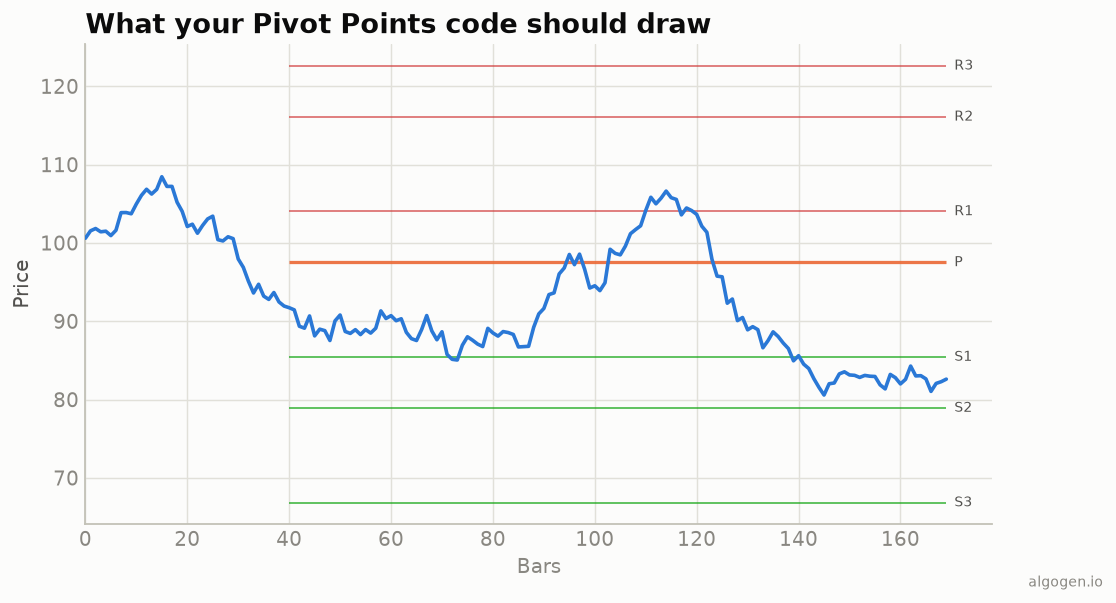
Pivot Points in EasyLanguage means capturing the prior session’s high, low, and close, then plotting the levels for the current session. See the explainer for the formulas.
What you’ll need
- TradeStation or MultiCharts
- The EasyLanguage / PowerLanguage Editor, new Indicator
- An intraday chart
The source
{ AlgoGen Pivot Points — TradeStation / MultiCharts }
variables:
    PriorH( 0 ), PriorL( 0 ), PriorC( 0 ),
    P( 0 ), Rng( 0 ),
    intrabarpersist DayH( 0 ), intrabarpersist DayL( 0 );

{ Track the current session's high/low; snapshot them at the day roll }
if Date <> Date[1] then begin
    PriorH = DayH;
    PriorL = DayL;
    PriorC = Close[1];              { last close of the prior session }
    DayH = High;                    { reset trackers for the new day }
    DayL = Low;
end
else begin
    DayH = MaxList( DayH, High );
    DayL = MinList( DayL, Low );
end;

P   = ( PriorH + PriorL + PriorC ) / 3;
Rng = PriorH - PriorL;

if PriorH > 0 then begin
    Plot1( P,                   "P" );
    Plot2( 2 * P - PriorL,      "R1" );
    Plot3( 2 * P - PriorH,      "S1" );
    Plot4( P + Rng,             "R2" );
    Plot5( P - Rng,             "S2" );
    Plot6( PriorH + 2*(P - PriorL), "R3" );
    Plot7( PriorL - 2*(PriorH - P), "S3" );
end;
We track the running day high/low, snapshot them into PriorH/PriorL at the session
roll (Date <> Date[1]), and compute the levels from that prior session — the
horizontal lines from the output chart.
Gotchas
- Prior session, not current. The levels use the completed prior day; snapshot at the day roll rather than using the live bar.
intrabarpersist. Keeps the running day high/low correct when the study runs on every tick, not just bar close.- Session definition.
Date <> Date[1]marks the calendar-day boundary; for markets with custom sessions, use the appropriate session logic.
Same indicator elsewhere: Python, MQL5, Pine Script, NinjaScript. Then backtest it in AlgoGen.
This post is educational, not financial advice. Indicators describe the past; they don’t predict the future. Backtest anything before you risk real money on it.
Sources and further reading
- What is EasyLanguage? (TradeStation)