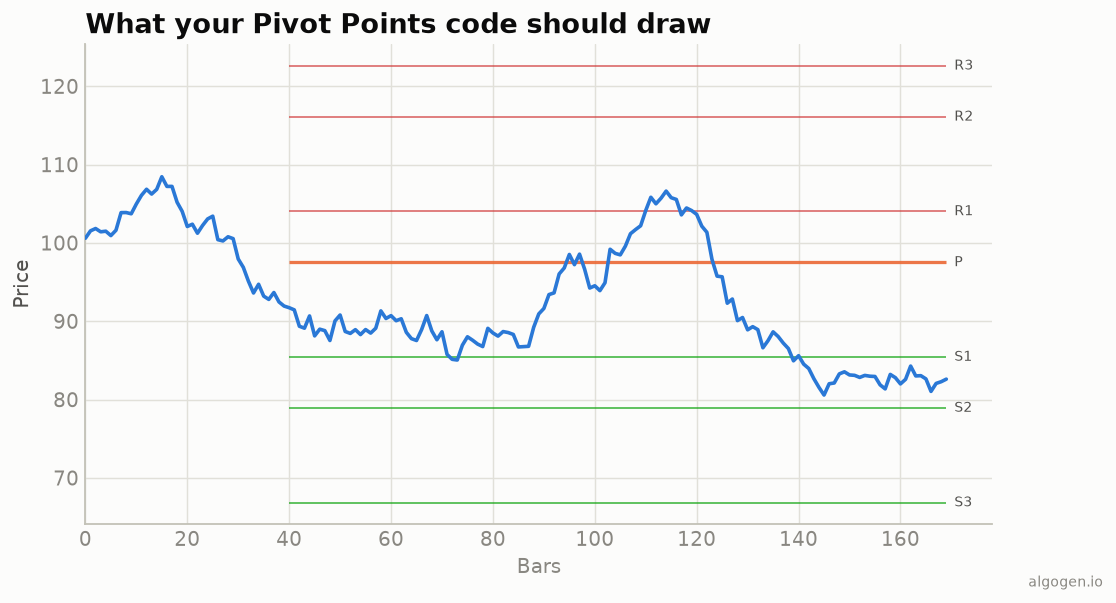
Pine can pull the prior day’s bar with request.security, making from-scratch daily
pivots straightforward. See the explainer for the
formulas.
What you’ll need
- A TradingView account (free tier is fine)
- The Pine Editor, on an intraday chart
The source
//@version=5
indicator("AlgoGen Pivot Points", shorttitle="AG PP", overlay=true)

// Prior daily bar (previous day's H/L/C).
pH = request.security(syminfo.tickerid, "D", high[1], lookahead=barmerge.lookahead_on)
pL = request.security(syminfo.tickerid, "D", low[1],  lookahead=barmerge.lookahead_on)
pC = request.security(syminfo.tickerid, "D", close[1], lookahead=barmerge.lookahead_on)

P   = (pH + pL + pC) / 3
rng = pH - pL

plot(P,               "P",  color=color.orange, style=plot.style_stepline)
plot(2 * P - pL,      "R1", color=color.red,    style=plot.style_stepline)
plot(2 * P - pH,      "S1", color=color.green,  style=plot.style_stepline)
plot(P + rng,         "R2", color=color.red,    style=plot.style_stepline)
plot(P - rng,         "S2", color=color.green,  style=plot.style_stepline)
plot(pH + 2*(P - pL), "R3", color=color.red,    style=plot.style_stepline)
plot(pL - 2*(pH - P), "S3", color=color.green,  style=plot.style_stepline)
request.security(..., "D", high[1], ...) pulls the prior daily high; the [1]
plus a daily anchor is what gives you yesterday’s completed bar. The stepline style
makes the levels hold flat across the day and jump at the session boundary — the
horizontal levels from the output chart.
The built-in
Recent Pine also has ta.pivot_point_levels("Traditional", ...), which returns the
levels for you if you’d rather not spell out the formulas.
A variant: Camarilla levels
Camarilla pivots pack tighter levels for range trading, using the prior close and range with fixed multipliers:
r3c = pC + rng * 1.1 / 4
r4c = pC + rng * 1.1 / 2
s3c = pC - rng * 1.1 / 4
s4c = pC - rng * 1.1 / 2
plot(r4c, "R4", color=color.red), plot(r3c, "R3", color=color.red)
plot(s3c, "S3", color=color.green), plot(s4c, "S4", color=color.green)
The R3/S3 levels are common reversal zones and R4/S4 breakout triggers in the Camarilla method — the same “levels from the prior bar” idea with different constants.
Gotchas
[1]for the prior day. Requestinghigh(nothigh[1]) on the daily anchor gives today’s forming high — look-ahead. Use[1].lookahead_onhere is intentional and safe because we already reference the prior, completed bar with[1]; this is the documented idiom for prior-period levels. (Never combinelookahead_onwith the current period’s data.)- Session convention. For 24-hour symbols, which “day” the anchor uses changes the levels.
Same indicator elsewhere: Python, MQL5, EasyLanguage, NinjaScript. Then test a pivot rule in AlgoGen.
This post is educational, not financial advice. Indicators describe the past; they don’t predict the future. Backtest anything before you risk real money on it.
Sources and further reading
- Pine Script built-ins (TradingView)