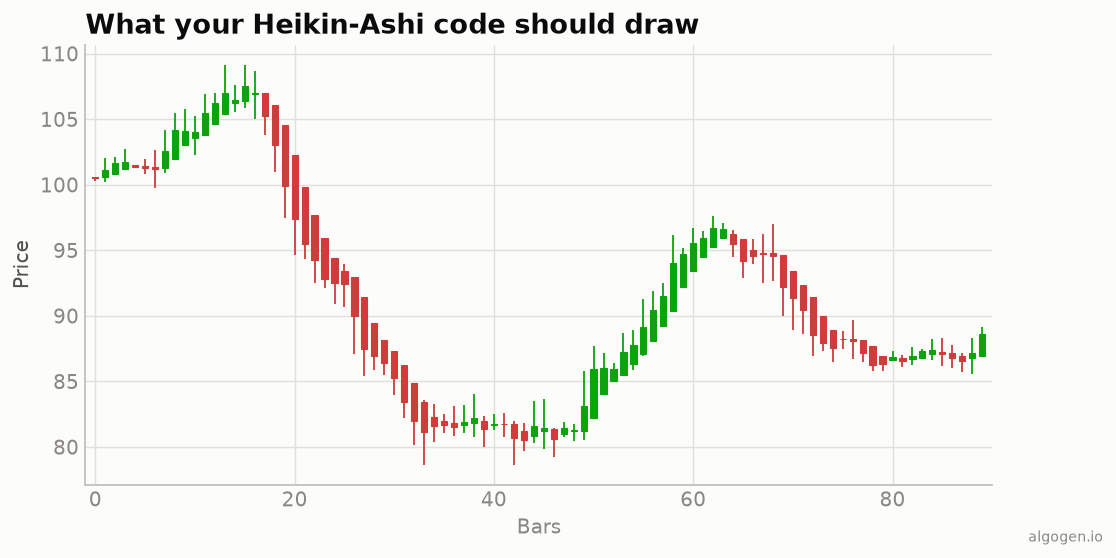
NinjaTrader 8 ships a Heikin-Ashi bar type you can select from the chart, but coding it as an indicator is instructive — and lets you compute on the HA values in your own strategies. Here’s the C#. See the explainer.
What you’ll need
- NinjaTrader 8 and the NinjaScript Editor (New → Indicator)
The source
public class AlgoGenHeikinAshi : Indicator
{
    private Series<double> haOpen;
    private Series<double> haClose;

    protected override void OnStateChange()
    {
        if (State == State.SetDefaults)
        {
            Name = "AlgoGen Heikin-Ashi";
            IsOverlay = true;
            AddPlot(new Stroke(Brushes.MediumSeaGreen, 2), PlotStyle.Bar, "HAClose");
        }
        else if (State == State.DataLoaded)
        {
            haOpen  = new Series<double>(this);
            haClose = new Series<double>(this);
        }
    }

    protected override void OnBarUpdate()
    {
        haClose[0] = (Open[0] + High[0] + Low[0] + Close[0]) / 4.0;

        if (CurrentBar == 0)
            haOpen[0] = (Open[0] + Close[0]) / 2.0;              // seed
        else
            haOpen[0] = (haOpen[1] + haClose[1]) / 2.0;          // recursive

        double haHigh = Math.Max(High[0], Math.Max(haOpen[0], haClose[0]));
        double haLow  = Math.Min(Low[0],  Math.Min(haOpen[0], haClose[0]));

        // Expose HA close as the plot; colour by direction.
        Value[0] = haClose[0];
        PlotBrushes[0][0] = haClose[0] >= haOpen[0]
            ? Brushes.MediumSeaGreen : Brushes.Tomato;
    }
}
The two Series<double> members hold the recursive haOpen and haClose so [1] can
read the previous bar. PlotBrushes[0][0] colours each bar by whether the HA candle is
up or down.
Full candles vs a line
The snippet above plots the HA close as a coloured bar, which is enough for most trend reads. If you want true candle rendering, the cleaner route in NinjaTrader is to switch the chart’s bar type to “Heikin Ashi” (Data Series → Type), which draws proper HA candles natively. Use the indicator version when you need the HA values in code — for example, to build an HA-smoothed moving average or a colour-flip entry.
Gotchas
haOpenandhaClosemust beSeries<double>. A plaindoublecan’t be indexed with[1], and the recursion needs the previous bar’s value.- Seed on
CurrentBar == 0. The first bar has no prior HA candle. haOpen[1]is the HA open, notOpen[1]. Reading the raw open breaks the smoothing.- HA values are averages. For real fills and stops, use the actual
Close[0]/Open[0].
A colour-flip signal
if (haClose[0] >= haOpen[0] && haClose[1] < haOpen[1])
    Draw.TriangleUp(this, "up" + CurrentBar, false, 0, Low[0] - TickSize, Brushes.Green);
That marks the bar where Heikin-Ashi flips from red to green — a tidy trend-change cue to test in AlgoGen.
Same candles elsewhere: Python, MQL5, Pine Script, EasyLanguage.
This post is educational, not financial advice. Indicators describe the past; they don’t predict the future. Backtest anything before you risk real money on it.
Sources and further reading
- NinjaScript system indicator methods (NinjaTrader)