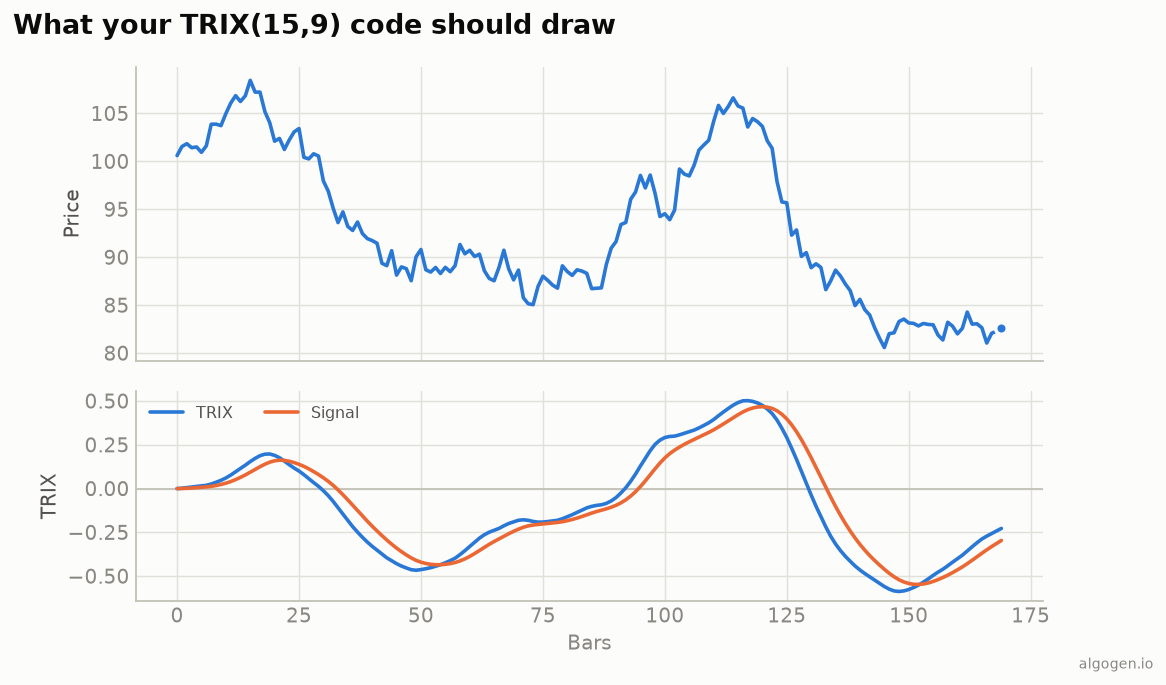
TRIX in NinjaScript chains the built-in EMA over intermediate Series, then takes
a rate of change. See the explainer for the concept.
What you’ll need
- NinjaTrader 8
- New → NinjaScript Editor → Indicators → New Indicator, name it
AlgoGenTRIX
The source
#region Using declarations
using System;
using System.Windows.Media;
using NinjaTrader.NinjaScript;
using NinjaTrader.NinjaScript.Indicators;
#endregion

namespace NinjaTrader.NinjaScript.Indicators
{
    public class AlgoGenTRIX : Indicator
    {
        private Series<double> e1, e2, e3;

        protected override void OnStateChange()
        {
            if (State == State.SetDefaults)
            {
                Name        = "AlgoGen TRIX";
                Description = "Triple Exponential (TRIX) with signal";
                Length = 15; SignalLen = 9;
                IsOverlay = false;

                AddPlot(new Stroke(Brushes.DodgerBlue, 2), PlotStyle.Line, "Trix");
                AddPlot(new Stroke(Brushes.OrangeRed, 2),  PlotStyle.Line, "Signal");
                AddLine(Brushes.Gray, 0, "Zero");
            }
            else if (State == State.DataLoaded)
            {
                e1 = new Series<double>(this);
                e2 = new Series<double>(this);
                e3 = new Series<double>(this);
            }
        }

        protected override void OnBarUpdate()
        {
            // Chain three EMAs via intermediate Series.
            e1[0] = EMA(Close, Length)[0];
            e2[0] = EMA(e1, Length)[0];
            e3[0] = EMA(e2, Length)[0];

            if (CurrentBar == 0) { Trix[0] = 0; Signal[0] = 0; return; }

            Trix[0]   = e3[1] != 0 ? 100.0 * (e3[0] - e3[1]) / e3[1] : 0.0;
            Signal[0] = EMA(Trix, SignalLen)[0];
        }

        #region Properties
        [NinjaScriptProperty][System.ComponentModel.DataAnnotations.Range(1, int.MaxValue)]
        [System.ComponentModel.Display(Name = "Length", GroupName = "Parameters", Order = 0)]
        public int Length { get; set; }

        [NinjaScriptProperty][System.ComponentModel.DataAnnotations.Range(1, int.MaxValue)]
        [System.ComponentModel.Display(Name = "SignalLen", GroupName = "Parameters", Order = 1)]
        public int SignalLen { get; set; }

        [Gui.Browsable(false)][System.Xml.Serialization.XmlIgnore] public Series<double> Trix   => Values[0];
        [Gui.Browsable(false)][System.Xml.Serialization.XmlIgnore] public Series<double> Signal => Values[1];
        #endregion
    }
}
Compile & apply
- Press F5 to compile.
- Add AlgoGen TRIX to a chart; the TRIX and signal lines draw in their own panel around zero, matching the output chart.
Gotchas
EMA(e1, Length)over a Series. Feed each EMA the previous EMA’s Series, notCloseagain — that’s what chains the triple smoothing.- ROC of the third EMA. Take the rate of change of
e3, after all three passes. - Signal is
EMA(Trix, ...). Smooth the TRIX plot itself for the signal line; keepinge1/e2/e3andTrixas Series makes the look-backs work across reloads.
That’s the five-language set: Python, MQL5, Pine Script, EasyLanguage, and this one. Now test a TRIX rule in AlgoGen.
This post is educational, not financial advice. Indicators describe the past; they don’t predict the future. Backtest anything before you risk real money on it.
Sources and further reading
- NinjaScript system indicator methods (NinjaTrader)