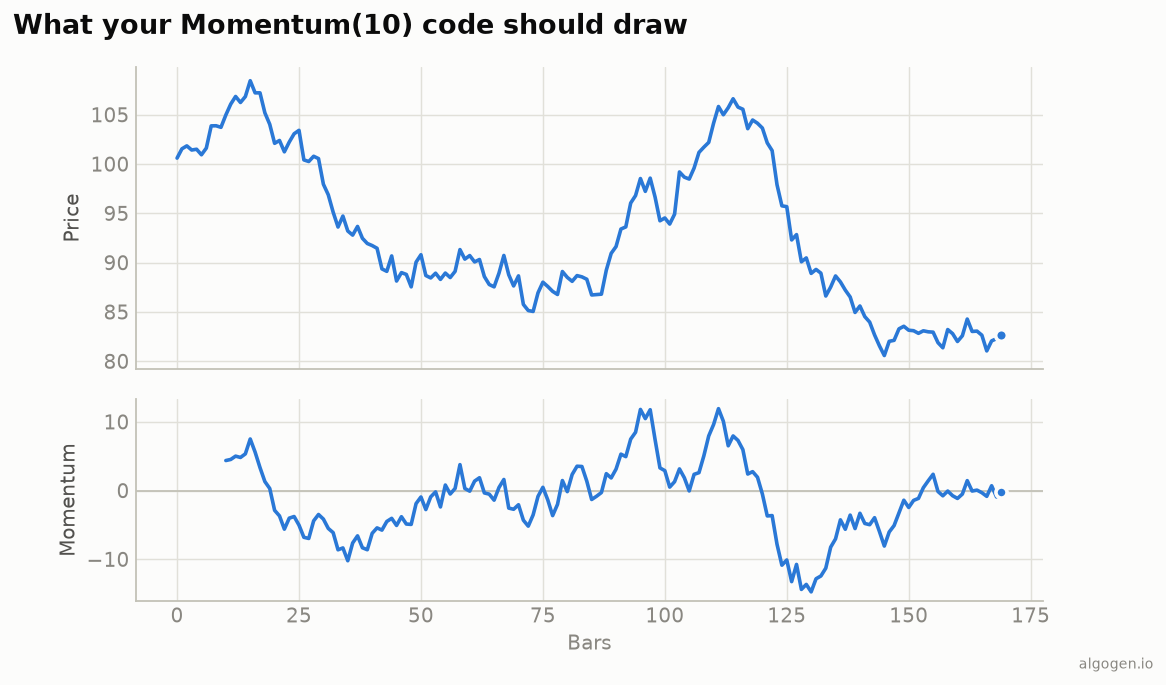
Momentum is one line of arithmetic, but MT5 has a quirk worth knowing: its built-in
iMomentum uses the ratio form (centered on 100), while many traders expect the
difference form (centered on 0). This custom version gives you the difference
form. See the explainer.
What you’ll need
- MetaTrader 5 with MetaEditor
- Save as
AlgoGen.Momentum.mq5underMQL5/Indicators/
The source
//+------------------------------------------------------------------+
//|                                             AlgoGen.Momentum.mq5 |
//|                                          Copyright 2026, AlgoGen |
//|                                           https://www.algogen.io |
//+------------------------------------------------------------------+
#property copyright "Copyright 2026, AlgoGen"
#property link      "https://www.algogen.io"
#property version   "1.00"
#property indicator_separate_window
#property indicator_buffers 1
#property indicator_plots   1

#property indicator_label1  "Momentum"
#property indicator_type1   DRAW_LINE
#property indicator_color1  clrDodgerBlue
#property indicator_width1  2
#property indicator_level1  0.0

input int  InpPeriod = 10;
input bool InpRatioForm = false; // true = ratio (around 100), false = difference (around 0)

double MomBuffer[];

int OnInit()
  {
   SetIndexBuffer(0, MomBuffer, INDICATOR_DATA);
   PlotIndexSetInteger(0, PLOT_DRAW_BEGIN, InpPeriod);
   IndicatorSetString(INDICATOR_SHORTNAME, "AlgoGen Momentum(" + (string)InpPeriod + ")");
   return(INIT_SUCCEEDED);
  }

int OnCalculate(const int rates_total, const int prev_calculated,
                const datetime &time[], const double &open[],
                const double &high[],   const double &low[],
                const double &close[],  const long &tick_volume[],
                const long &volume[],   const int &spread[])
  {
   if(rates_total <= InpPeriod) return(0);
   int start = (prev_calculated > InpPeriod) ? prev_calculated - 1 : InpPeriod;
   for(int i = start; i < rates_total; i++)
     {
      double past = close[i - InpPeriod];
      if(InpRatioForm)
         MomBuffer[i] = (past != 0.0) ? 100.0 * close[i] / past : 100.0;
      else
         MomBuffer[i] = close[i] - past;
     }
   return(rates_total);
  }
//+------------------------------------------------------------------+
Install & compile
- Drop it in
MQL5/Indicators/, press F7. - Drag onto a chart — a separate window shows Momentum around its zero line (or 100,
if you flip
InpRatioForm), matching the output chart.
Gotchas
- Difference vs ratio. MT5’s
iMomentumis the ratio form (around 100); this custom one defaults to the difference form (around 0). TheInpRatioFormswitch lets you match whichever convention you want. PLOT_DRAW_BEGIN. Set toInpPeriodso the line doesn’t draw before an N-bars-ago price exists.- MQL4. Same math; swap the
OnCalculatesignature. MQL4’siMomentumis also the ratio form. - Signal line / smoothing. For crossover signals, add a second buffer with a short
iMAOnArray(MomBuffer, ...)and act when Momentum crosses it — steadier than the raw line. - Trend filter. Gate zero-crosses on a longer moving average of price to skip the range-bound whipsaw; Momentum, like all unfiltered momentum tools, chops in ranges.
Same indicator elsewhere: Python, Pine Script, EasyLanguage, NinjaScript. Then test a Momentum rule in AlgoGen.
This post is educational, not financial advice. Indicators describe the past; they don’t predict the future. Backtest anything before you risk real money on it.
Sources and further reading
- Technical indicator functions (MetaQuotes)