NinjaTrader is a favorite of the futures crowd, and its indicators are just C#
classes — which means if you can read a for loop, you can build the RSI. Yes,
NinjaTrader ships one already. But rolling your own is how you learn the platform
and how you get a buffer you can feed into a custom strategy without renting
someone’s “indicator suite.”
What you’ll need
- NinjaTrader 8
- New → NinjaScript Editor → Indicators → New Indicator, name it
AlgoGenRSI
The source
We keep two running series for the Wilder averages and seed the first value with
a simple average over Period bars — identical logic to every other post in this
series.
#region Using declarations
using System;
using NinjaTrader.NinjaScript;
using NinjaTrader.NinjaScript.Indicators;
#endregion

namespace NinjaTrader.NinjaScript.Indicators
{
    public class AlgoGenRSI : Indicator
    {
        private Series<double> avgGain;
        private Series<double> avgLoss;

        protected override void OnStateChange()
        {
            if (State == State.SetDefaults)
            {
                Name        = "AlgoGen RSI";
                Description = "Wilder-smoothed Relative Strength Index";
                Period      = 14;
                IsOverlay   = false;

                AddPlot(new Stroke(System.Windows.Media.Brushes.DodgerBlue, 2), PlotStyle.Line, "RSI");
                AddLine(System.Windows.Media.Brushes.Silver, 70, "Overbought");
                AddLine(System.Windows.Media.Brushes.Silver, 30, "Oversold");
            }
            else if (State == State.DataLoaded)
            {
                avgGain = new Series<double>(this);
                avgLoss = new Series<double>(this);
            }
        }

        protected override void OnBarUpdate()
        {
            if (CurrentBar == 0)
            {
                avgGain[0] = 0;
                avgLoss[0] = 0;
                RSI[0]     = 50;   // neutral until there's history
                return;
            }

            double change = Close[0] - Close[1];
            double gain   = Math.Max(change, 0.0);
            double loss   = Math.Max(-change, 0.0);

            if (CurrentBar < Period)
            {
                // Build the seed as a simple average over the first window.
                avgGain[0] = (avgGain[1] * CurrentBar + gain) / (CurrentBar + 1);
                avgLoss[0] = (avgLoss[1] * CurrentBar + loss) / (CurrentBar + 1);
            }
            else
            {
                // Wilder smoothing.
                avgGain[0] = (avgGain[1] * (Period - 1) + gain) / Period;
                avgLoss[0] = (avgLoss[1] * (Period - 1) + loss) / Period;
            }

            RSI[0] = avgLoss[0] == 0 ? 100.0
                     : 100.0 - (100.0 / (1.0 + avgGain[0] / avgLoss[0]));
        }

        #region Properties
        [NinjaScriptProperty]
        [System.ComponentModel.DataAnnotations.Range(1, int.MaxValue)]
        [System.ComponentModel.Display(Name = "Period", GroupName = "Parameters", Order = 0)]
        public int Period { get; set; }

        [Gui.Browsable(false)]
        [System.Xml.Serialization.XmlIgnore]
        public Series<double> RSI => Values[0];
        #endregion
    }
}
Compile & apply
- In the NinjaScript Editor, press F5 to compile. Fix nothing — it builds clean.
- On a chart, right-click → Indicators → add AlgoGen RSI.
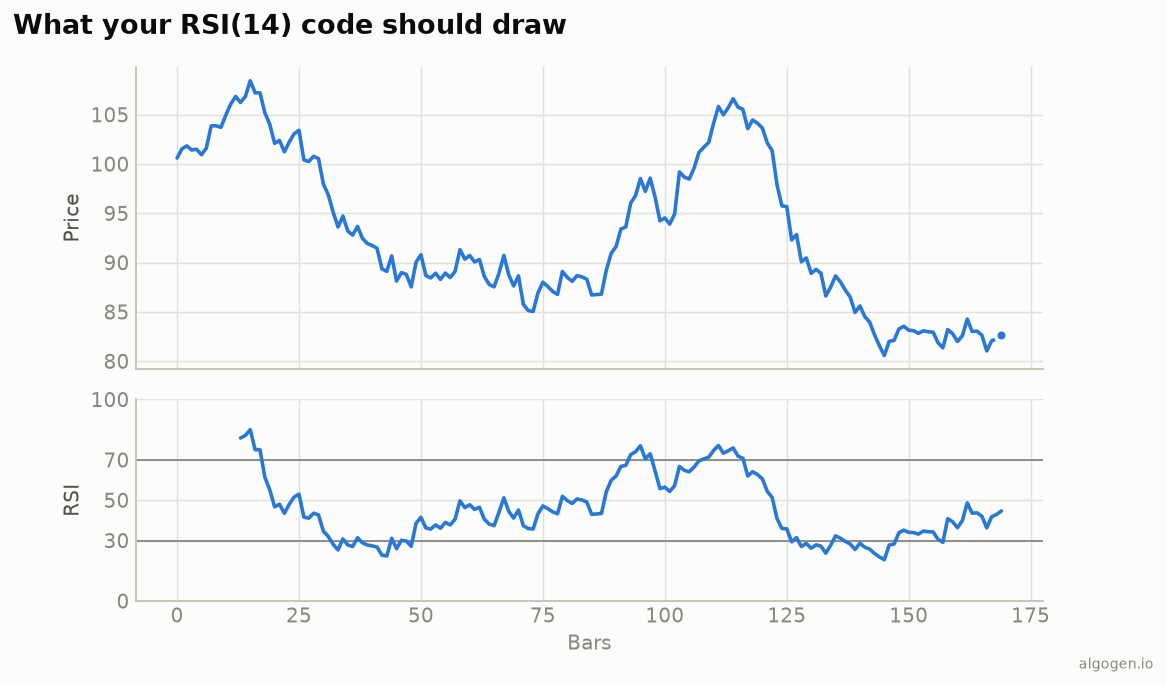
- Set the period; it plots in its own panel with the 70/30 lines, matching the output chart above.
Gotchas
Series<double>for state. StoringavgGain/avgLossas indicatorSeries(not plain fields) means NinjaTrader handles historical recalculation and[1]look-backs correctly. Plaindoublefields break on reload.- Warm-up seeding. Before
CurrentBarreachesPeriod, we grow a simple running average, then switch to Wilder smoothing — this reproduces the standard RSI rather than starting cold. - Neutral start. RSI is set to 50 on bar 0 purely so the plot has a value; it’s meaningless until the window fills.
That completes the five-language set: Python, MQL5, Pine Script, EasyLanguage, and this one. Five languages, one identical line — because the indicator was never the expensive part. Now put an RSI rule through a real backtest in AlgoGen and find out if it’s worth trading.
This post is educational, not financial advice. Indicators describe the past; they don’t predict the future. Backtest anything before you risk real money on it.
Sources and further reading
- New Concepts in Technical Trading Systems (Windsor Books)
- NinjaScript system indicator methods (NinjaTrader)